HarmonyOS 6(API 23)实战:基于HMAF的「记忆织网」——PC端AI智能体记忆图谱与多模态感知管理平台
文章目录
-
- 每日一句正能量
- 一、前言:当智能体拥有"记忆"
- 二、系统架构设计
-
- 2.1 技术架构全景
- 三、核心组件实战
-
- 3.1 三层记忆数据模型(MemoryModel.ets)
- 3.2 记忆存储引擎(MemoryStorageEngine.ets)
- 3.3 记忆宫殿可视化组件(MemoryPalace.ets)
- 3.4 悬浮记忆导航(MemoryFloatNavigation.ets)
- 3.5 HMAF记忆智能体集群(MemoryAgentCluster.ets)
- 3.6 多模态记忆注入器(MultimodalInjector.ets)
- 四、沉浸光感与悬浮导航的协同设计
-
- 4.1 记忆类型光效映射
- 4.2 悬浮导航状态徽章
- 五、关键技术总结
-
- 5.1 HMAF记忆智能体开发清单
- 5.2 沉浸光感实现清单
- 六、调试与适配建议
- 七、结语

每日一句正能量
“健康无恙便是圆满,身体安好,才能奔赴远方。”
把健康视为“1”,其他成就、财富、关系都是后面的“0”。没有健康,一切归零。这里“圆满”不是指完美人生,而是指具备了最根本的基础——只要身体安好,就有能力去追求任何远方。
一、前言:当智能体拥有"记忆"
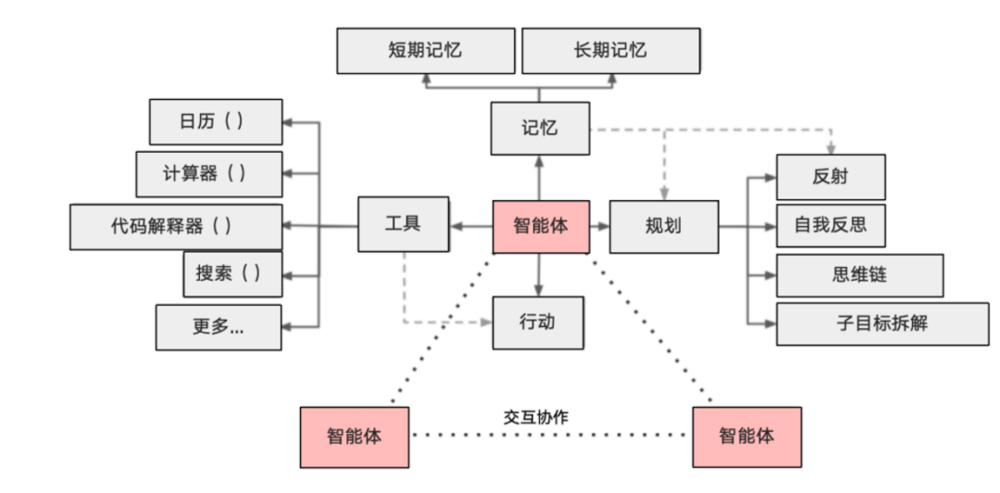
2026年,AI智能体已从简单的对话工具进化为具备长期记忆、情境理解和多模态感知的数字生命体。然而,当前大多数智能体平台面临一个核心痛点——记忆碎片化:对话历史散落在不同会话中,知识图谱与向量记忆相互割裂,多模态信息(语音、图像、文档)缺乏统一索引。
HarmonyOS 6(API 23)的HMAF(HarmonyOS Multi-Agent Framework)框架,结合**悬浮导航(Float Navigation)与沉浸光感(Immersive Light Effects)**特性,为PC端智能体记忆管理带来了"记忆即氛围、检索即光效"的全新交互范式。本文将实战构建「记忆织网」——一个基于三层记忆架构(工作记忆/情景记忆/语义记忆)的AI智能体记忆图谱管理平台。
本文核心亮点:
- 三层记忆架构:工作记忆(实时上下文)、情景记忆(时间轴事件)、语义记忆(知识图谱)的统一管理
- 记忆宫殿可视化:基于ArkUI的3D记忆图谱渲染,支持节点拖拽与关系编辑
- 多模态记忆注入:语音、图像、文档的统一向量化存储与语义检索
- 悬浮记忆导航:底部悬浮导航栏实时显示记忆状态徽章与检索进度
- 沉浸光感记忆氛围:根据记忆类型(工作/情景/语义)动态切换环境光色与脉冲节奏
- HMAF记忆智能体集群:6大记忆Agent协同完成感知、理解、归档、演化全流程
二、系统架构设计
2.1 技术架构全景
「记忆织网」采用五层架构设计,从系统能力层到应用层逐层构建:
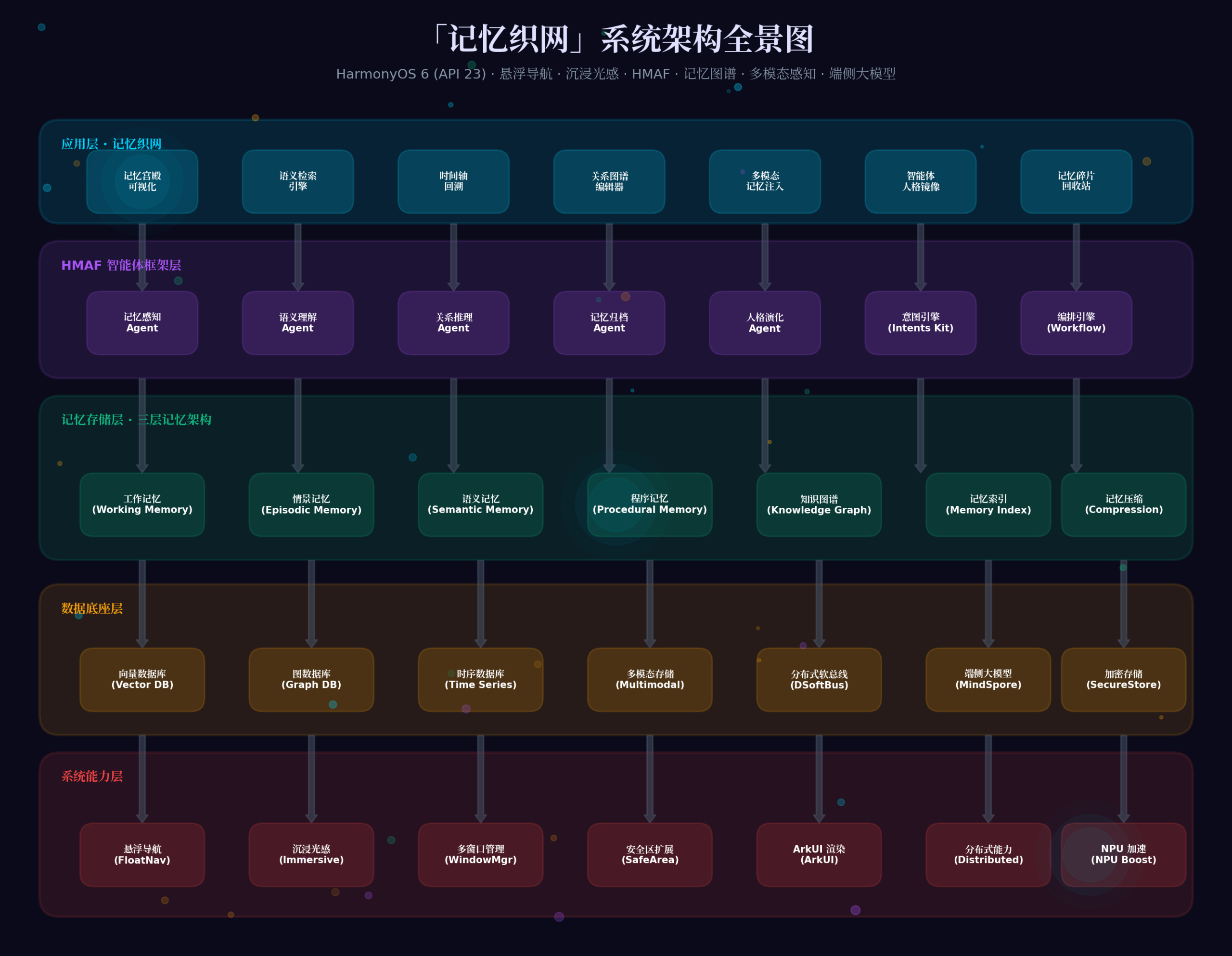
系统能力层:依托HarmonyOS 6的悬浮导航、沉浸光感、多窗口管理、安全区扩展、ArkUI渲染、分布式能力、NPU加速七大系统能力。
数据底座层:向量数据库(记忆语义检索)、图数据库(关系图谱)、时序数据库(时间轴事件)、多模态存储(音视频/图像)、分布式软总线(跨设备同步)、端侧大模型(MindSpore Lite)、加密存储(隐私保护)。
记忆存储层:三层记忆架构——工作记忆(Working Memory,实时上下文窗口)、情景记忆(Episodic Memory,时间轴事件流)、语义记忆(Semantic Memory,知识图谱)、程序记忆(Procedural Memory,操作习惯)、知识图谱(Knowledge Graph,实体关系)、记忆索引(Memory Index,快速检索)、记忆压缩(Compression,长期归档)。
HMAF框架层:6大记忆Agent——记忆感知Agent(多模态输入)、语义理解Agent(向量化与意图识别)、关系推理Agent(图谱构建)、记忆归档Agent(分层存储)、人格演化Agent(用户画像)、意图引擎(Intents Kit)、编排引擎(Workflow)。
应用层:记忆宫殿可视化、语义检索引擎、时间轴回溯、关系图谱编辑器、多模态记忆注入、智能体人格镜像、记忆碎片回收站。
三、核心组件实战
3.1 三层记忆数据模型(MemoryModel.ets)
首先定义三层记忆的核心数据模型,这是整个系统的数据基石:
// entry/src/main/ets/models/MemoryModel.ets
// 记忆类型枚举
export enum MemoryType {
  WORKING = 'working',      // 工作记忆:实时上下文,短期保留
  EPISODIC = 'episodic',    // 情景记忆:时间轴事件,带时间戳
  SEMANTIC = 'semantic',    // 语义记忆:知识实体与关系
  PROCEDURAL = 'procedural', // 程序记忆:操作习惯与技能
  KNOWLEDGE = 'knowledge'    // 知识图谱:结构化知识网络
}
// 记忆状态枚举
export enum MemoryStatus {
  ACTIVE = 'active',        // 激活态,可被检索
  ARCHIVED = 'archived',    // 归档态,长期存储
  COMPRESSED = 'compressed', // 压缩态,摘要存储
  RECYCLED = 'recycled'     // 回收态,待清理
}
// 多模态内容类型
export enum ContentType {
  TEXT = 'text',
  VOICE = 'voice',
  IMAGE = 'image',
  DOCUMENT = 'document',
  VIDEO = 'video',
  CODE = 'code'
}
// 基础记忆单元
export interface MemoryUnit {
  id: string;
  type: MemoryType;
  status: MemoryStatus;
  content: MemoryContent;
  metadata: MemoryMetadata;
  vector: number[];          // 语义向量
  relations: string[];       // 关联记忆ID列表
  createdAt: number;
  updatedAt: number;
  accessCount: number;       // 访问频次,用于记忆强化
  emotionalTag?: string;     // 情感标签(正/负/中)
}
// 记忆内容
export interface MemoryContent {
  contentType: ContentType;
  text?: string;             // 文本内容或OCR结果
  mediaUrl?: string;         // 媒体文件路径
  thumbnail?: string;        // 缩略图
  duration?: number;         // 音视频时长
  language?: string;         // 语言类型
}
// 记忆元数据
export interface MemoryMetadata {
  source: string;            // 来源(小艺/用户输入/系统记录)
  sessionId?: string;        // 会话ID
  location?: string;         // 地理位置
  deviceId?: string;         // 设备ID
  confidence: number;        // 置信度
  tags: string[];            // 标签
  category?: string;         // 分类
}
// 工作记忆(短期)
export interface WorkingMemory extends MemoryUnit {
  contextWindow: string[];   // 上下文窗口
  relevanceScore: number;    // 相关性评分
  ttl: number;               // 生存时间(秒)
}
// 情景记忆(时间轴)
export interface EpisodicMemory extends MemoryUnit {
  timestamp: number;       // 精确时间戳
  location: string;        // 地点
  participants: string[];  // 参与者
  eventType: string;        // 事件类型
  emotionalIntensity: number; // 情感强度 0-1
}
// 语义记忆(知识)
export interface SemanticMemory extends MemoryUnit {
  entityName: string;        // 实体名称
  entityType: string;        // 实体类型(人/物/概念/地点)
  attributes: Record<string, string>; // 属性
  synonyms: string[];         // 同义词
  definition?: string;       // 定义
}
// 知识图谱关系
export interface KnowledgeRelation {
  id: string;
  sourceId: string;          // 源实体ID
  targetId: string;          // 目标实体ID
  relationType: string;      // 关系类型(属于/包含/关联/因果)
  strength: number;         // 关系强度 0-1
  bidirectional: boolean;    // 是否双向
  evidence: string[];        // 证据记忆ID
}
// 记忆检索结果
export interface MemoryRetrievalResult {
  memory: MemoryUnit;
  similarity: number;        // 相似度
  retrievalPath: string[];   // 检索路径(多跳推理)
  contextMemories: MemoryUnit[]; // 上下文记忆
}
3.2 记忆存储引擎(MemoryStorageEngine.ets)
基于HarmonyOS 6的分布式数据管理能力,构建支持向量检索、图遍历、时序查询的混合存储引擎:
// entry/src/main/ets/engine/MemoryStorageEngine.ets
import { relationalStore } from '@kit.ArkData';
import { distributedKVStore } from '@kit.ArkData';
import { fileIo } from '@kit.CoreFileKit';
export class MemoryStorageEngine {
  private static instance: MemoryStorageEngine;
  private vectorDB: relationalStore.RdbStore | null = null;
  private graphDB: relationalStore.RdbStore | null = null;
  private timeSeriesDB: distributedKVStore.SingleKVStore | null = null;
  private multimodalStore: string = ''; // 多媒体文件存储路径
  private constructor() {}
  static async getInstance(): Promise<MemoryStorageEngine> {
    if (!MemoryStorageEngine.instance) {
      MemoryStorageEngine.instance = new MemoryStorageEngine();
      await MemoryStorageEngine.instance.initialize();
    }
    return MemoryStorageEngine.instance;
  }
  private async initialize(): Promise<void> {
    // 初始化向量数据库(使用SQLite + 向量扩展)
    this.vectorDB = await relationalStore.getRdbStore(getContext(), {
      name: 'memory_vector.db',
      securityLevel: relationalStore.SecurityLevel.S2
    });
    // 创建向量表(768维,基于MindSpore Lite嵌入模型)
    await this.vectorDB.executeSql(`
      CREATE TABLE IF NOT EXISTS memory_vectors (
        id TEXT PRIMARY KEY,
        vector BLOB NOT NULL,
        memory_type TEXT,
        content_hash TEXT,
        created_at INTEGER,
        access_count INTEGER DEFAULT 0
      )
    `);
    // 创建向量索引(使用IVF-FLAT近似最近邻)
    await this.vectorDB.executeSql(`
      CREATE INDEX IF NOT EXISTS idx_vector_ann
      ON memory_vectors USING ivfflat(vector)
      WITH (lists = 100, probes = 10)
    `);
    // 初始化图数据库(知识图谱关系)
    this.graphDB = await relationalStore.getRdbStore(getContext(), {
      name: 'memory_graph.db',
      securityLevel: relationalStore.SecurityLevel.S2
    });
    await this.graphDB.executeSql(`
      CREATE TABLE IF NOT EXISTS knowledge_relations (
        id TEXT PRIMARY KEY,
        source_id TEXT,
        target_id TEXT,
        relation_type TEXT,
        strength REAL,
        bidirectional INTEGER,
        evidence TEXT,
        created_at INTEGER
      )
    `);
    // 初始化时序数据库(情景记忆时间轴)
    this.timeSeriesDB = await distributedKVStore.createKVManager({
      bundleName: getContext().applicationInfo.name
    }).getKVStore({
      storeId: 'episodic_memory',
      securityLevel: distributedKVStore.SecurityLevel.S2,
      type: distributedKVStore.KVStoreType.SINGLE_VERSION
    });
    // 初始化多模态存储目录
    this.multimodalStore = getContext().filesDir + '/multimodal/';
    await fileIo.mkdir(this.multimodalStore);
  }
  // 存储记忆单元
  async storeMemory(memory: MemoryUnit): Promise<void> {
    // 1. 存储向量(语义检索)
    await this.vectorDB?.executeSql(
      `INSERT OR REPLACE INTO memory_vectors
       (id, vector, memory_type, content_hash, created_at, access_count)
       VALUES (?, ?, ?, ?, ?, ?)`,
      [memory.id, JSON.stringify(memory.vector), memory.type,
       this.hashContent(memory.content), memory.createdAt, memory.accessCount]
    );
    // 2. 存储关系(知识图谱)
    if (memory.relations.length > 0) {
      for (const relationId of memory.relations) {
        await this.graphDB?.executeSql(
          `INSERT OR REPLACE INTO knowledge_relations
           (id, source_id, target_id, relation_type, strength, created_at)
           VALUES (?, ?, ?, ?, ?, ?)`,
          [`${memory.id}_${relationId}`, memory.id, relationId, '关联', 0.8, Date.now()]
        );
      }
    }
    // 3. 存储时序数据(情景记忆)
    if (memory.type === MemoryType.EPISODIC) {
      await this.timeSeriesDB?.put(
        `episodic_${memory.id}`,
        JSON.stringify(memory)
      );
    }
    // 4. 存储多模态文件
    if (memory.content.mediaUrl) {
      const destPath = this.multimodalStore + memory.id + '_' +
        memory.content.contentType;
      await fileIo.copy(memory.content.mediaUrl, destPath);
    }
  }
  // 语义向量检索(基于余弦相似度)
  async semanticSearch(queryVector: number[], topK: number = 10,
                       memoryType?: MemoryType): Promise<MemoryRetrievalResult[]> {
    let sql = `SELECT id, vector, memory_type, access_count,
               (vector <=> ?) as similarity
               FROM memory_vectors`;
    if (memoryType) {
      sql += ` WHERE memory_type = '${memoryType}'`;
    }
    sql += ` ORDER BY similarity DESC LIMIT ${topK}`;
    const resultSet = await this.vectorDB?.querySql(sql, [JSON.stringify(queryVector)]);
    const results: MemoryRetrievalResult[] = [];
    while (resultSet?.goToNextRow()) {
      const id = resultSet.getString(resultSet.getColumnIndex('id'));
      const similarity = resultSet.getDouble(resultSet.getColumnIndex('similarity'));
      // 获取完整记忆
      const memory = await this.getMemoryById(id);
      if (memory) {
        results.push({
          memory,
          similarity,
          retrievalPath: [id],
          contextMemories: await this.getContextMemories(id, 3)
        });
      }
    }
    resultSet?.close();
    return results;
  }
  // 图遍历检索(多跳推理)
  async graphTraverse(startId: string, depth: number = 2,
                      minStrength: number = 0.5): Promise<MemoryUnit[]> {
    const visited = new Set<string>();
    const queue: Array<{id: string, depth: number}> = [{id: startId, depth: 0}];
    const results: MemoryUnit[] = [];
    while (queue.length > 0) {
      const current = queue.shift()!;
      if (visited.has(current.id) || current.depth > depth) continue;
      visited.add(current.id);
      const memory = await this.getMemoryById(current.id);
      if (memory) results.push(memory);
      // 获取关联节点
      const relationSet = await this.graphDB?.querySql(
        `SELECT target_id, strength FROM knowledge_relations
         WHERE source_id = ? AND strength >= ?`,
        [current.id, minStrength]
      );
      while (relationSet?.goToNextRow()) {
        const targetId = relationSet.getString(relationSet.getColumnIndex('target_id'));
        queue.push({id: targetId, depth: current.depth + 1});
      }
      relationSet?.close();
    }
    return results;
  }
  // 时序范围查询(时间轴回溯)
  async timeRangeQuery(startTime: number, endTime: number,
                       eventType?: string): Promise<EpisodicMemory[]> {
    const results: EpisodicMemory[] = [];
    const entries = await this.timeSeriesDB?.getEntries();
    for (const entry of entries || []) {
      if (entry.key.startsWith('episodic_')) {
        const memory: EpisodicMemory = JSON.parse(entry.value.toString());
        if (memory.timestamp >= startTime && memory.timestamp <= endTime) {
          if (!eventType || memory.eventType === eventType) {
            results.push(memory);
          }
        }
      }
    }
    return results.sort((a, b) => b.timestamp - a.timestamp);
  }
  // 记忆强化(访问频次更新)
  async reinforceMemory(memoryId: string): Promise<void> {
    await this.vectorDB?.executeSql(
      `UPDATE memory_vectors
       SET access_count = access_count + 1
       WHERE id = ?`,
      [memoryId]
    );
  }
  // 记忆压缩(长期归档)
  async compressMemory(memoryId: string): Promise<void> {
    const memory = await this.getMemoryById(memoryId);
    if (!memory) return;
    // 使用端侧大模型生成摘要
    const summary = await this.generateSummary(memory);
    // 更新为压缩态
    memory.status = MemoryStatus.COMPRESSED;
    memory.content.text = summary;
    memory.vector = await this.embedText(summary);
    await this.storeMemory(memory);
  }
  private async generateSummary(memory: MemoryUnit): Promise<string> {
    // 调用端侧MindSpore Lite模型生成摘要
    // 实际实现需接入HMAF的LLM Agent
    return `[摘要] ${memory.content.text?.substring(0, 100)}...`;
  }
  private async embedText(text: string): Promise<number[]> {
    // 调用MindSpore Lite嵌入模型生成768维向量
    // 实际实现需接入AI系统底座
    return new Array(768).fill(0).map(() => Math.random() - 0.5);
  }
  private hashContent(content: MemoryContent): string {
    // 内容哈希,用于去重
    return content.text ? content.text.substring(0, 32) : '';
  }
  private async getMemoryById(id: string): Promise<MemoryUnit | null> {
    // 从各数据源聚合完整记忆
    // 简化实现,实际需从统一存储查询
    return null;
  }
  private async getContextMemories(memoryId: string, count: number): Promise<MemoryUnit[]> {
    // 获取上下文关联记忆
    return [];
  }
}
3.3 记忆宫殿可视化组件(MemoryPalace.ets)
基于ArkUI的Canvas和动画系统,构建3D记忆图谱可视化界面,支持节点拖拽、关系连线、光效反馈:
// entry/src/main/ets/components/MemoryPalace.ets
import { Canvas, CanvasRenderingContext2D } from '@kit.ArkUI';
import { MemoryType, MemoryUnit, KnowledgeRelation } from '../models/MemoryModel';
interface NodePosition {
  x: number;
  y: number;
  z: number; // 深度,用于3D效果
  targetX: number;
  targetY: number;
  velocity: { x: number; y: number };
}
@Component
export struct MemoryPalace {
  @State memoryNodes: Map<string, MemoryUnit> = new Map();
  @State nodePositions: Map<string, NodePosition> = new Map();
  @State relations: KnowledgeRelation[] = [];
  @State selectedNodeId: string = '';
  @State hoveredNodeId: string = '';
  @State zoomLevel: number = 1.0;
  @State offsetX: number = 0;
  @State offsetY: number = 0;
  @State isDragging: boolean = false;
  @State dragStart: { x: number; y: number } = { x: 0, y: 0 };
  @State currentMemoryType: MemoryType = MemoryType.SEMANTIC;
  @State lightIntensity: number = 0.6;
  @State pulsePhase: number = 0;
  private canvasRef: CanvasRef | null = null;
  private animationId: number = 0;
  private context: CanvasRenderingContext2D | null = null;
  // 记忆类型颜色映射(沉浸光感)
  private memoryColors: Record<MemoryType, string> = {
    [MemoryType.WORKING]: '#06B6D4',    // 工作记忆:青色脉冲
    [MemoryType.EPISODIC]: '#F59E0B',   // 情景记忆:琥珀色流光
    [MemoryType.SEMANTIC]: '#8B5CF6',   // 语义记忆:紫色星云
    [MemoryType.PROCEDURAL]: '#10B981', // 程序记忆:翡翠色稳定
    [MemoryType.KNOWLEDGE]: '#EC4899'   // 知识图谱:玫红色网络
  };
  aboutToAppear(): void {
    this.loadMemories();
    this.startAnimationLoop();
  }
  aboutToDisappear(): void {
    if (this.animationId) {
      clearInterval(this.animationId);
    }
  }
  private async loadMemories(): Promise<void> {
    // 从存储引擎加载记忆节点
    // 模拟数据生成
    const sampleNodes = this.generateSampleNodes();
    sampleNodes.forEach(node => {
      this.memoryNodes.set(node.id, node);
      this.nodePositions.set(node.id, {
        x: Math.random() * 800,
        y: Math.random() * 600,
        z: Math.random() * 200,
        targetX: 0, targetY: 0,
        velocity: { x: 0, y: 0 }
      });
    });
  }
  private generateSampleNodes(): MemoryUnit[] {
    return [
      {
        id: 'mem_001',
        type: MemoryType.SEMANTIC,
        status: MemoryStatus.ACTIVE,
        content: { contentType: ContentType.TEXT, text: '鸿蒙操作系统' },
        metadata: { source: 'user', confidence: 0.95, tags: ['OS', '华为'] },
        vector: [], relations: ['mem_002', 'mem_003'],
        createdAt: Date.now(), updatedAt: Date.now(), accessCount: 42,
        entityName: 'HarmonyOS', entityType: '概念'
      } as SemanticMemory,
      // ... 更多节点
    ];
  }
  private startAnimationLoop(): void {
    this.animationId = setInterval(() => {
      this.pulsePhase = (this.pulsePhase + 0.05) % (Math.PI * 2);
      this.updateNodePositions();
      this.drawCanvas();
    }, 33); // 30fps
  }
  private updateNodePositions(): void {
    // 力导向图布局算法
    const nodes = Array.from(this.nodePositions.entries());
    const centerX = 400;
    const centerY = 300;
    for (const [id, pos] of nodes) {
      const memory = this.memoryNodes.get(id);
      if (!memory) continue;
      // 向中心引力
      const dx = centerX - pos.x;
      const dy = centerY - pos.y;
      pos.velocity.x += dx * 0.001;
      pos.velocity.y += dy * 0.001;
      // 节点间斥力
      for (const [otherId, otherPos] of nodes) {
        if (id === otherId) continue;
        const dist = Math.sqrt((pos.x - otherPos.x) ** 2 + (pos.y - otherPos.y) ** 2);
        if (dist < 150) {
          const force = (150 - dist) / 150 * 2;
          pos.velocity.x += (pos.x - otherPos.x) / dist * force;
          pos.velocity.y += (pos.y - otherPos.y) / dist * force;
        }
      }
      // 关系引力(关联节点相互吸引)
      for (const relationId of memory.relations) {
        const otherPos = this.nodePositions.get(relationId);
        if (otherPos) {
          pos.velocity.x += (otherPos.x - pos.x) * 0.002;
          pos.velocity.y += (otherPos.y - pos.y) * 0.002;
        }
      }
      // 阻尼
      pos.velocity.x *= 0.9;
      pos.velocity.y *= 0.9;
      // 更新位置
      pos.x += pos.velocity.x;
      pos.y += pos.velocity.y;
    }
  }
  private drawCanvas(): void {
    if (!this.context) return;
    const ctx = this.context;
    const width = 800;
    const height = 600;
    // 清空画布(深色背景,沉浸光感)
    ctx.fillStyle = '#0a0a1a';
    ctx.fillRect(0, 0, width, height);
    // 绘制背景光效(根据当前记忆类型)
    const baseColor = this.memoryColors[this.currentMemoryType];
    const gradient = ctx.createRadialGradient(width/2, height/2, 0, width/2, height/2, width);
    gradient.addColorStop(0, baseColor + '15');
    gradient.addColorStop(0.5, baseColor + '08');
    gradient.addColorStop(1, 'transparent');
    ctx.fillStyle = gradient;
    ctx.fillRect(0, 0, width, height);
    // 绘制关系连线
    ctx.strokeStyle = baseColor + '40';
    ctx.lineWidth = 1;
    for (const relation of this.relations) {
      const sourcePos = this.nodePositions.get(relation.sourceId);
      const targetPos = this.nodePositions.get(relation.targetId);
      if (sourcePos && targetPos) {
        ctx.beginPath();
        ctx.moveTo(sourcePos.x, sourcePos.y);
        ctx.lineTo(targetPos.x, targetPos.y);
        ctx.stroke();
        // 关系强度指示器(脉冲光效)
        const midX = (sourcePos.x + targetPos.x) / 2;
        const midY = (sourcePos.y + targetPos.y) / 2;
        const pulse = Math.sin(this.pulsePhase + relation.strength * Math.PI) * 0.5 + 0.5;
        ctx.fillStyle = baseColor + Math.floor(pulse * 255).toString(16).padStart(2, '0');
        ctx.beginPath();
        ctx.arc(midX, midY, 3 + pulse * 2, 0, Math.PI * 2);
        ctx.fill();
      }
    }
    // 绘制记忆节点
    for (const [id, pos] of this.nodePositions) {
      const memory = this.memoryNodes.get(id);
      if (!memory) continue;
      const isSelected = id === this.selectedNodeId;
      const isHovered = id === this.hoveredNodeId;
      const nodeColor = this.memoryColors[memory.type];
      // 3D深度效果(z轴影响大小和透明度)
      const depthScale = 1 - pos.z / 400;
      const alpha = 0.5 + depthScale * 0.5;
      const size = (20 + memory.accessCount * 2) * depthScale;
      // 光晕效果(选中或悬停时增强)
      if (isSelected || isHovered) {
        const glowRadius = size * 2;
        const glowGradient = ctx.createRadialGradient(pos.x, pos.y, 0, pos.x, pos.y, glowRadius);
        glowGradient.addColorStop(0, nodeColor + '60');
        glowGradient.addColorStop(0.5, nodeColor + '20');
        glowGradient.addColorStop(1, 'transparent');
        ctx.fillStyle = glowGradient;
        ctx.beginPath();
        ctx.arc(pos.x, pos.y, glowRadius, 0, Math.PI * 2);
        ctx.fill();
      }
      // 节点主体
      ctx.fillStyle = nodeColor + Math.floor(alpha * 255).toString(16).padStart(2, '0');
      ctx.beginPath();
      ctx.arc(pos.x, pos.y, size, 0, Math.PI * 2);
      ctx.fill();
      // 节点边框
      ctx.strokeStyle = isSelected ? '#ffffff' : nodeColor + '80';
      ctx.lineWidth = isSelected ? 3 : 1;
      ctx.stroke();
      // 节点标签
      ctx.fillStyle = '#ffffff';
      ctx.font = `${12 * depthScale}px sans-serif`;
      ctx.textAlign = 'center';
      ctx.fillText(
        memory.type === MemoryType.SEMANTIC ? (memory as SemanticMemory).entityName : memory.id,
        pos.x, pos.y + size + 15
      );
      // 记忆类型图标
      ctx.fillStyle = '#ffffff';
      ctx.font = `${10 * depthScale}px sans-serif`;
      ctx.fillText(this.getTypeIcon(memory.type), pos.x, pos.y + 4);
    }
  }
  private getTypeIcon(type: MemoryType): string {
    const icons: Record<MemoryType, string> = {
      [MemoryType.WORKING]: '⚡',
      [MemoryType.EPISODIC]: '📅',
      [MemoryType.SEMANTIC]: '🧠',
      [MemoryType.PROCEDURAL]: '⚙️',
      [MemoryType.KNOWLEDGE]: '🕸️'
    };
    return icons[type];
  }
  build() {
    Column() {
      // 沉浸光感标题栏
      Row() {
        Text('记忆宫殿')
          .fontSize(24)
          .fontWeight(FontWeight.Bold)
          .fontColor('#e0e0ff')
        Blank()
        // 记忆类型切换器(带动画光效)
        Row({ space: 12 }) {
          ForEach(Object.values(MemoryType), (type: MemoryType) => {
            Column() {
              Text(this.getTypeIcon(type))
                .fontSize(20)
                .fontColor(this.currentMemoryType === type ? '#ffffff' : '#666666')
              Text(type)
                .fontSize(10)
                .fontColor(this.currentMemoryType === type ? this.memoryColors[type] : '#666666')
            }
            .width(60)
            .height(60)
            .backgroundColor(this.currentMemoryType === type ?
              this.memoryColors[type] + '30' : 'transparent')
            .borderRadius(12)
            .onClick(() => {
              this.currentMemoryType = type;
              this.lightIntensity = 0.6;
            })
            .animation({
              duration: 300,
              curve: Curve.Spring,
              iterations: 1
            })
          })
        }
      }
      .width('100%')
      .height(80)
      .padding(16)
      .backgroundBlurStyle(BlurStyle.REGULAR)
      .backdropFilter($r('sys.blur.20'))
      // 3D记忆图谱画布
      Canvas(this.canvasRef)
        .width('100%')
        .height(500)
        .backgroundColor('#0a0a1a')
        .onReady((context) => {
          this.context = context;
          this.drawCanvas();
        })
        .onTouch((event: TouchEvent) => {
          const touch = event.touches[0];
          switch (event.type) {
            case TouchType.Down:
              this.isDragging = true;
              this.dragStart = { x: touch.x, y: touch.y };
              // 检测节点点击
              for (const [id, pos] of this.nodePositions) {
                const dist = Math.sqrt((touch.x - pos.x) ** 2 + (touch.y - pos.y) ** 2);
                if (dist < 30) {
                  this.selectedNodeId = id;
                  this.reinforceMemory(id);
                  break;
                }
              }
              break;
            case TouchType.Move:
              if (this.isDragging && !this.selectedNodeId) {
                this.offsetX += touch.x - this.dragStart.x;
                this.offsetY += touch.y - this.dragStart.y;
                this.dragStart = { x: touch.x, y: touch.y };
              }
              break;
            case TouchType.Up:
              this.isDragging = false;
              break;
          }
        })
        .gesture(
          PinchGesture()
            .onActionUpdate((event: GestureEvent) => {
              this.zoomLevel *= event.scale;
              this.zoomLevel = Math.max(0.5, Math.min(3.0, this.zoomLevel));
            })
        )
      // 记忆详情面板(选中时展开)
      if (this.selectedNodeId) {
        this.MemoryDetailPanel()
      }
    }
    .width('100%')
    .height('100%')
    .expandSafeArea([SafeAreaType.SYSTEM], [SafeAreaEdge.TOP, SafeAreaEdge.BOTTOM])
    .backgroundColor('#0a0a1a')
  }
  @Builder
  MemoryDetailPanel() {
    Column() {
      // 玻璃拟态背景
      Stack() {
        Column()
          .width('100%')
          .height('100%')
          .backgroundBlurStyle(BlurStyle.REGULAR)
          .opacity(0.8)
          .backdropFilter($r('sys.blur.20'))
        Column()
          .width('100%')
          .height('100%')
          .linearGradient({
            direction: GradientDirection.Top,
            colors: [
              [this.memoryColors[this.currentMemoryType] + '20', 0.0],
              ['transparent', 1.0]
            ]
          })
      }
      // 记忆内容
      Column({ space: 12 }) {
        Text('记忆详情')
          .fontSize(18)
          .fontWeight(FontWeight.Bold)
          .fontColor('#ffffff')
        // 记忆元数据
        Row({ space: 8 }) {
          Text(`类型: ${this.currentMemoryType}`)
            .fontSize(12)
            .fontColor(this.memoryColors[this.currentMemoryType])
            .padding({ left: 8, right: 8, top: 4, bottom: 4 })
            .backgroundColor(this.memoryColors[this.currentMemoryType] + '20')
            .borderRadius(4)
          Text(`访问: ${this.memoryNodes.get(this.selectedNodeId)?.accessCount}次`)
            .fontSize(12)
            .fontColor('#8899aa')
        }
        // 记忆内容预览
        Text(this.memoryNodes.get(this.selectedNodeId)?.content.text || '')
          .fontSize(14)
          .fontColor('#cccccc')
          .maxLines(5)
          .textOverflow({ overflow: TextOverflow.Ellipsis })
        // 关联记忆
        Text('关联记忆')
          .fontSize(14)
          .fontWeight(FontWeight.Medium)
          .fontColor('#ffffff')
        Row({ space: 8 }) {
          ForEach(this.memoryNodes.get(this.selectedNodeId)?.relations || [],
            (relationId: string) => {
              Text(relationId)
                .fontSize(11)
                .fontColor('#8899aa')
                .padding(6)
                .backgroundColor('#1a1a2e')
                .borderRadius(4)
            }
          )
        }
      }
      .padding(16)
    }
    .width('100%')
    .height(200)
    .borderRadius({ topLeft: 24, topRight: 24 })
    .shadow({
      radius: 20,
      color: this.memoryColors[this.currentMemoryType] + '40',
      offsetX: 0,
      offsetY: -4
    })
    .animation({
      duration: 400,
      curve: Curve.Spring,
      iterations: 1
    })
  }
  private async reinforceMemory(memoryId: string): Promise<void> {
    const engine = await MemoryStorageEngine.getInstance();
    await engine.reinforceMemory(memoryId);
  }
}
3.4 悬浮记忆导航(MemoryFloatNavigation.ets)
底部悬浮导航栏,实时显示记忆状态、检索进度、类型徽章,支持长按展开透明度调节:
// entry/src/main/ets/components/MemoryFloatNavigation.ets
import { window } from '@kit.ArkUI';
import { MemoryType, MemoryStatus } from '../models/MemoryModel';
interface MemoryNavItem {
  id: string;
  icon: string;
  label: string;
  memoryType: MemoryType;
  badge?: number;
}
@Component
export struct MemoryFloatNavigation {
  @State currentIndex: number = 0;
  @State navTransparency: number = 0.75;
  @State isExpanded: boolean = false;
  @State bottomAvoidHeight: number = 0;
  @State currentMemoryType: MemoryType = MemoryType.SEMANTIC;
  @State isIndexing: boolean = false;
  @State memoryCount: number = 0;
  @State pulseColor: string = '#8B5CF6';
  private navItems: MemoryNavItem[] = [
    { id: 'palace', icon: '🏛️', label: '宫殿', memoryType: MemoryType.SEMANTIC },
    { id: 'timeline', icon: '📅', label: '时间轴', memoryType: MemoryType.EPISODIC },
    { id: 'working', icon: '⚡', label: '工作区', memoryType: MemoryType.WORKING },
    { id: 'search', icon: '🔍', label: '检索', memoryType: MemoryType.KNOWLEDGE },
    { id: 'inject', icon: '💉', label: '注入', memoryType: MemoryType.PROCEDURAL }
  ];
  private memoryColors: Record<MemoryType, string> = {
    [MemoryType.WORKING]: '#06B6D4',
    [MemoryType.EPISODIC]: '#F59E0B',
    [MemoryType.SEMANTIC]: '#8B5CF6',
    [MemoryType.PROCEDURAL]: '#10B981',
    [MemoryType.KNOWLEDGE]: '#EC4899'
  };
  aboutToAppear(): void {
    this.getBottomAvoidArea();
    // 监听记忆状态变化
    AppStorage.setOrCreate('memory_type_change', (type: MemoryType) => {
      this.currentMemoryType = type;
      this.pulseColor = this.memoryColors[type];
    });
    // 监听索引状态
    AppStorage.setOrCreate('indexing_status', (status: boolean) => {
      this.isIndexing = status;
    });
  }
  private async getBottomAvoidArea(): Promise<void> {
    try {
      const mainWindow = await window.getLastWindow();
      const avoidArea = mainWindow.getWindowAvoidArea(window.AvoidAreaType.TYPE_NAVIGATION_INDICATOR);
      this.bottomAvoidHeight = avoidArea.bottomRect.height;
    } catch (error) {
      console.error('Failed to get avoid area:', error);
    }
  }
  build() {
    Stack({ alignContent: Alignment.Bottom }) {
      // 内容层
      Column() {
        // 主内容区域由父组件注入
      }
      .padding({ bottom: this.bottomAvoidHeight + 90 })
      // 悬浮导航栏
      Column() {
        Stack() {
          // 玻璃拟态背景
          Column()
            .width('100%')
            .height('100%')
            .backgroundBlurStyle(BlurStyle.REGULAR)
            .opacity(this.navTransparency)
            .backdropFilter($r('sys.blur.20'))
          // 记忆类型光效层(动态渐变)
          Column()
            .width('100%')
            .height('100%')
            .linearGradient({
              direction: GradientDirection.Top,
              colors: [
                [this.pulseColor + '20', 0.0],
                ['transparent', 0.6],
                [this.pulseColor + '10', 1.0]
              ]
            })
            .animation({
              duration: 2000,
              curve: Curve.Linear,
              iterations: -1
            })
        }
        .width('100%')
        .height('100%')
        .borderRadius(28)
        .shadow({
          radius: 24,
          color: this.pulseColor + '30',
          offsetX: 0,
          offsetY: -6
        })
        // 导航项
        Row() {
          ForEach(this.navItems, (item: MemoryNavItem, index: number) => {
            Column() {
              Stack() {
                Text(item.icon)
                  .fontSize(24)
                  .fontColor(this.currentIndex === index ? this.pulseColor : '#666666')
                // 记忆数量徽章
                if (item.badge && item.badge > 0) {
                  Column() {
                    Text(`${item.badge}`)
                      .fontSize(10)
                      .fontColor('#ffffff')
                  }
                  .width(18)
                  .height(18)
                  .backgroundColor('#EF4444')
                  .borderRadius(9)
                  .position({ x: 20, y: -6 })
                }
                // 索引中脉冲指示器
                if (item.memoryType === this.currentMemoryType && this.isIndexing) {
                  Column()
                    .width(8)
                    .height(8)
                    .backgroundColor(this.pulseColor)
                    .borderRadius(4)
                    .position({ x: 22, y: -4 })
                    .shadow({
                      radius: 8,
                      color: this.pulseColor,
                      offsetX: 0,
                      offsetY: 0
                    })
                    .animation({
                      duration: 1000,
                      curve: Curve.Linear,
                      iterations: -1
                    })
                }
                // 类型指示器
                if (item.memoryType === this.currentMemoryType) {
                  Column()
                    .width(6)
                    .height(6)
                    .backgroundColor(this.pulseColor)
                    .borderRadius(3)
                    .position({ x: 20, y: 22 })
                }
              }
              .width(44)
              .height(44)
              Text(item.label)
                .fontSize(11)
                .fontColor(this.currentIndex === index ? this.pulseColor : '#999999')
                .margin({ top: 4 })
            }
            .layoutWeight(1)
            .onClick(() => {
              this.currentIndex = index;
              this.currentMemoryType = item.memoryType;
              this.pulseColor = this.memoryColors[item.memoryType];
              this.switchMemoryType(item.memoryType);
              this.triggerHapticFeedback();
            })
          })
        }
        .width('100%')
        .height(80)
        .padding({ left: 20, right: 20 })
        .justifyContent(FlexAlign.SpaceAround)
        // 透明度调节(长按展开)
        if (this.isExpanded) {
          Row() {
            Text('透明度')
              .fontSize(12)
              .fontColor('#666666')
              .margin({ right: 12 })
            Slider({
              value: this.navTransparency * 100,
              min: 50,
              max: 90,
              step: 10,
              style: SliderStyle.InSet
            })
              .width(140)
              .onChange((value: number) => {
                this.navTransparency = value / 100;
              })
            Text(`${Math.round(this.navTransparency * 100)}%`)
              .fontSize(12)
              .fontColor('#666666')
              .margin({ left: 12 })
          }
          .width('100%')
          .height(44)
          .justifyContent(FlexAlign.Center)
          .backgroundColor('rgba(255,255,255,0.5)')
          .borderRadius({ topLeft: 16, topRight: 16 })
        }
      }
      .width('92%')
      .height(this.isExpanded ? 124 : 80)
      .margin({ bottom: this.bottomAvoidHeight + 16, left: '4%', right: '4%' })
      .animation({
        duration: 300,
        curve: Curve.Spring,
        iterations: 1
      })
      .gesture(
        LongPressGesture({ duration: 500 })
          .onAction(() => {
            this.isExpanded = !this.isExpanded;
          })
      )
    }
    .width('100%')
    .height('100%')
  }
  private async switchMemoryType(type: MemoryType): Promise<void> {
    AppStorage.setOrCreate('current_memory_type', type);
    // 通知记忆宫殿切换视图
    AppStorage.setOrCreate('memory_palace_refresh', Date.now());
  }
  private triggerHapticFeedback(): void {
    try {
      import('@kit.SensorServiceKit').then(sensor => {
        sensor.vibrator.startVibration({
          type: 'time',
          duration: 40
        }, { id: 0 });
      });
    } catch (error) {
      console.error('Haptic feedback failed:', error);
    }
  }
}
3.5 HMAF记忆智能体集群(MemoryAgentCluster.ets)
基于HMAF框架构建6大记忆Agent,协同完成记忆的全生命周期管理:
// entry/src/main/ets/agents/MemoryAgentCluster.ets
import { hmaf } from '@kit.AgentFrameworkKit';
import { intents } from '@kit.IntentsKit';
import { MemoryType, MemoryUnit, MemoryContent, ContentType } from '../models/MemoryModel';
// 智能体类型枚举
export enum MemoryAgentType {
  PERCEPTION = 'perception',    // 记忆感知Agent
  UNDERSTANDING = 'understanding', // 语义理解Agent
  REASONING = 'reasoning',      // 关系推理Agent
  ARCHIVE = 'archive',          // 记忆归档Agent
  EVOLUTION = 'evolution',      // 人格演化Agent
  RETRIEVAL = 'retrieval'       // 检索编排Agent
}
// 智能体人格色彩映射(沉浸光感)
export enum AgentPersonality {
  PERCEPTION = '#06B6D4',      // 感知:青色
  UNDERSTANDING = '#8B5CF6',   // 理解:紫色
  REASONING = '#F59E0B',       // 推理:琥珀色
  ARCHIVE = '#10B981',         // 归档:翡翠色
  EVOLUTION = '#EC4899',       // 演化:玫红色
  RETRIEVAL = '#3B82F6'        // 检索:蓝色
}
export class MemoryAgentCluster {
  private static instance: MemoryAgentCluster;
  private hmafSession: hmaf.AgentSession | null = null;
  private intentEngine: intents.IntentEngine | null = null;
  // 智能体状态管理
  private agentStates: Map<string, AgentState> = new Map([
    ['perception-1', AgentState.IDLE],
    ['understanding-1', AgentState.IDLE],
    ['reasoning-1', AgentState.IDLE],
    ['archive-1', AgentState.IDLE],
    ['evolution-1', AgentState.IDLE],
    ['retrieval-1', AgentState.IDLE]
  ]);
  private constructor() {}
  static getInstance(): MemoryAgentCluster {
    if (!MemoryAgentCluster.instance) {
      MemoryAgentCluster.instance = new MemoryAgentCluster();
    }
    return MemoryAgentCluster.instance;
  }
  async initialize(): Promise<void> {
    // 初始化HMAF多智能体会话
    this.hmafSession = await hmaf.createAgentSession({
      mode: hmaf.AgentMode.MULTI_AGENT,
      enableDistributed: true,
      maxConcurrentAgents: 6
    });
    // 初始化意图引擎
    this.intentEngine = await intents.createIntentEngine({
      supportedDomains: ['memory_perception', 'semantic_understanding',
                        'relation_reasoning', 'memory_archive',
                        'personality_evolution', 'memory_retrieval']
    });
    // 注册六大记忆Agent
    await this.registerAgents();
    // 启动状态监听
    this.startStateMonitoring();
  }
  private async registerAgents(): Promise<void> {
    // 1. 记忆感知Agent:多模态输入处理
    await this.hmafSession?.registerAgent({
      agentId: 'perception-1',
      agentType: MemoryAgentType.PERCEPTION,
      capabilities: ['voice_recognition', 'image_analysis', 'document_parse',
                      'video_frame_extract', 'code_syntax_parse', 'multimodal_fusion'],
      modelConfig: {
        modelType: 'multimodal',
        temperature: 0.3,
        maxTokens: 1024
      }
    });
    // 2. 语义理解Agent:向量化与意图识别
    await this.hmafSession?.registerAgent({
      agentId: 'understanding-1',
      agentType: MemoryAgentType.UNDERSTANDING,
      capabilities: ['text_embedding', 'intent_classification', 'entity_extraction',
                      'sentiment_analysis', 'topic_modeling', 'semantic_role_labeling'],
      modelConfig: {
        modelType: 'llm',
        temperature: 0.2,
        maxTokens: 512
      }
    });
    // 3. 关系推理Agent:知识图谱构建
    await this.hmafSession?.registerAgent({
      agentId: 'reasoning-1',
      agentType: MemoryAgentType.REASONING,
      capabilities: ['relation_extraction', 'graph_reasoning', 'causal_inference',
                      'analogy_detection', 'contradiction_check', 'knowledge_completion'],
      modelConfig: {
        modelType: 'llm',
        temperature: 0.4,
        maxTokens: 1024
      }
    });
    // 4. 记忆归档Agent:分层存储管理
    await this.hmafSession?.registerAgent({
      agentId: 'archive-1',
      agentType: MemoryAgentType.ARCHIVE,
      capabilities: ['memory_classification', 'importance_scoring', 'redundancy_detection',
                      'compression_summarize', 'lifecycle_management', 'cross_device_sync'],
      modelConfig: {
        modelType: 'llm',
        temperature: 0.3,
        maxTokens: 512
      }
    });
    // 5. 人格演化Agent:用户画像构建
    await this.hmafSession?.registerAgent({
      agentId: 'evolution-1',
      agentType: MemoryAgentType.EVOLUTION,
      capabilities: ['preference_learning', 'habit_extraction', 'interest_modeling',
                      'personality_profile', 'behavior_prediction', 'adaptive_response'],
      modelConfig: {
        modelType: 'llm',
        temperature: 0.5,
        maxTokens: 1024
      }
    });
    // 6. 检索编排Agent:智能检索调度
    await this.hmafSession?.registerAgent({
      agentId: 'retrieval-1',
      agentType: MemoryAgentType.RETRIEVAL,
      capabilities: ['hybrid_search', 'multi_hop_reasoning', 'context_assembly',
                      'relevance_ranking', 'diversity_enhancement', 'temporal_filtering'],
      modelConfig: {
        modelType: 'llm',
        temperature: 0.3,
        maxTokens: 1024
      }
    });
  }
  // 多模态记忆注入流程
  async injectMemory(content: MemoryContent, source: string): Promise<MemoryUnit> {
    this.updateAgentState('perception-1', AgentState.EXECUTING);
    // Step 1: 感知Agent处理多模态输入
    const perceptionResult = await this.hmafSession?.sendTask({
      targetAgent: 'perception-1',
      taskType: 'multimodal_perception',
      payload: {
        contentType: content.contentType,
        rawData: content.mediaUrl || content.text,
        source: source
      }
    });
    this.updateAgentState('perception-1', AgentState.COMPLETED);
    this.updateAgentState('understanding-1', AgentState.EXECUTING);
    // Step 2: 理解Agent语义向量化
    const understandingResult = await this.hmafSession?.sendTask({
      targetAgent: 'understanding-1',
      taskType: 'semantic_understanding',
      payload: {
        text: perceptionResult?.extractedText,
        language: content.language,
        extractEntities: true,
        analyzeSentiment: true
      }
    });
    this.updateAgentState('understanding-1', AgentState.COMPLETED);
    this.updateAgentState('reasoning-1', AgentState.EXECUTING);
    // Step 3: 推理Agent构建关系
    const reasoningResult = await this.hmafSession?.sendTask({
      targetAgent: 'reasoning-1',
      taskType: 'relation_reasoning',
      payload: {
        entities: understandingResult?.entities,
        existingRelations: await this.getExistingRelations(),
        buildGraph: true
      }
    });
    this.updateAgentState('reasoning-1', AgentState.COMPLETED);
    this.updateAgentState('archive-1', AgentState.EXECUTING);
    // Step 4: 归档Agent分类存储
    const archiveResult = await this.hmafSession?.sendTask({
      targetAgent: 'archive-1',
      taskType: 'memory_archive',
      payload: {
        content: perceptionResult,
        semantics: understandingResult,
        relations: reasoningResult,
        determineType: true,
        calculateImportance: true
      }
    });
    this.updateAgentState('archive-1', AgentState.COMPLETED);
    // 构建最终记忆单元
    const memory: MemoryUnit = {
      id: `mem_${Date.now()}`,
      type: archiveResult?.memoryType || MemoryType.SEMANTIC,
      status: MemoryStatus.ACTIVE,
      content: {
        contentType: content.contentType,
        text: perceptionResult?.extractedText,
        mediaUrl: content.mediaUrl,
        language: content.language
      },
      metadata: {
        source: source,
        confidence: understandingResult?.confidence || 0.8,
        tags: understandingResult?.tags || [],
        category: archiveResult?.category
      },
      vector: understandingResult?.embedding || [],
      relations: reasoningResult?.relatedMemoryIds || [],
      createdAt: Date.now(),
      updatedAt: Date.now(),
      accessCount: 0,
      emotionalTag: understandingResult?.sentiment
    };
    // 存储到引擎
    const engine = await MemoryStorageEngine.getInstance();
    await engine.storeMemory(memory);
    // 触发人格演化(异步)
    this.evolvePersonality(memory);
    return memory;
  }
  // 智能检索流程
  async retrieveMemories(query: string, memoryType?: MemoryType,
                         topK: number = 10): Promise<MemoryRetrievalResult[]> {
    this.updateAgentState('retrieval-1', AgentState.EXECUTING);
    // Step 1: 检索Agent理解查询意图
    const retrievalPlan = await this.hmafSession?.sendTask({
      targetAgent: 'retrieval-1',
      taskType: 'retrieval_planning',
      payload: {
        query: query,
        targetType: memoryType,
        availableSources: ['vector', 'graph', 'timeseries'],
        strategy: 'hybrid'
      }
    });
    // Step 2: 执行混合检索
    const engine = await MemoryStorageEngine.getInstance();
    let results: MemoryRetrievalResult[] = [];
    if (retrievalPlan?.useVectorSearch) {
      const queryVector = await this.embedQuery(query);
      const vectorResults = await engine.semanticSearch(queryVector, topK, memoryType);
      results.push(...vectorResults);
    }
    if (retrievalPlan?.useGraphSearch && retrievalPlan?.seedNodeId) {
      const graphResults = await engine.graphTraverse(retrievalPlan.seedNodeId,
                                                       retrievalPlan.depth || 2);
      // 转换为检索结果格式
      results.push(...graphResults.map(m => ({
        memory: m,
        similarity: 0.7,
        retrievalPath: [retrievalPlan.seedNodeId, m.id],
        contextMemories: []
      })));
    }
    if (retrievalPlan?.useTimeRange) {
      const timeResults = await engine.timeRangeQuery(
        retrievalPlan.timeRange.start,
        retrievalPlan.timeRange.end,
        retrievalPlan.eventType
      );
      results.push(...timeResults.map(m => ({
        memory: m,
        similarity: 0.6,
        retrievalPath: [],
        contextMemories: []
      })));
    }
    // Step 3: 重排序与上下文组装
    const rerankedResults = await this.hmafSession?.sendTask({
      targetAgent: 'retrieval-1',
      taskType: 'result_reranking',
      payload: {
        results: results,
        query: query,
        diversityWeight: 0.3,
        relevanceWeight: 0.7
      }
    });
    this.updateAgentState('retrieval-1', AgentState.COMPLETED);
    return rerankedResults?.rankedResults || results.slice(0, topK);
  }
  // 人格演化(异步背景任务)
  private async evolvePersonality(newMemory: MemoryUnit): Promise<void> {
    this.updateAgentState('evolution-1', AgentState.THINKING);
    await this.hmafSession?.sendTask({
      targetAgent: 'evolution-1',
      taskType: 'personality_evolution',
      payload: {
        newMemory: newMemory,
        existingProfile: await this.getUserProfile(),
        updatePreferences: true,
        adjustResponseStyle: true
      }
    });
    this.updateAgentState('evolution-1', AgentState.COMPLETED);
  }
  private async embedQuery(query: string): Promise<number[]> {
    // 调用理解Agent生成查询向量
    const result = await this.hmafSession?.sendTask({
      targetAgent: 'understanding-1',
      taskType: 'text_embedding',
      payload: { text: query }
    });
    return result?.embedding || [];
  }
  private async getExistingRelations(): Promise<string[]> {
    // 获取现有关系列表
    return [];
  }
  private async getUserProfile(): Promise<object> {
    // 获取用户画像
    return {};
  }
  private updateAgentState(agentId: string, state: AgentState): void {
    this.agentStates.set(agentId, state);
    AppStorage.setOrCreate('agent_state_update', { agentId, state });
    // 同步更新UI光效
    const agentType = agentId.split('-')[0] as MemoryAgentType;
    const color = AgentPersonality[agentType.toUpperCase() as keyof typeof AgentPersonality];
    if (color) {
      AppStorage.setOrCreate('agent_light_color', color);
    }
  }
  private startStateMonitoring(): void {
    this.hmafSession?.on('agentStateChange', (event: { agentId: string; state: string }) => {
      this.updateAgentState(event.agentId, event.state as AgentState);
    });
  }
}
// 智能体状态枚举
export enum AgentState {
  IDLE = 'idle',
  THINKING = 'thinking',
  EXECUTING = 'executing',
  COMPLETED = 'completed',
  ERROR = 'error'
}
3.6 多模态记忆注入器(MultimodalInjector.ets)
支持语音、图像、文档、视频、代码的多模态记忆注入,统一向量化处理:
// entry/src/main/ets/components/MultimodalInjector.ets
import { media } from '@kit.MediaKit';
import { filePicker } from '@kit.FilePickerKit';
import { MemoryAgentCluster } from '../agents/MemoryAgentCluster';
import { MemoryContent, ContentType } from '../models/MemoryModel';
@Component
export struct MultimodalInjector {
  @State isRecording: boolean = false;
  @State recordingDuration: number = 0;
  @State selectedFiles: string[] = [];
  @State injectProgress: number = 0;
  @State currentStage: string = '准备';
  @State isInjecting: boolean = false;
  private recorder: media.AudioRecorder | null = null;
  private timer: number = 0;
  build() {
    Column({ space: 16 }) {
      Text('多模态记忆注入')
        .fontSize(20)
        .fontWeight(FontWeight.Bold)
        .fontColor('#e0e0ff')
      // 注入方式选择
      Row({ space: 12 }) {
        // 语音注入
        Column() {
          Stack() {
            Circle()
              .width(this.isRecording ? 80 : 60)
              .height(this.isRecording ? 80 : 60)
              .fill(this.isRecording ? '#EF4444' : '#06B6D4')
              .opacity(this.isRecording ? 0.3 : 0.2)
              .animation({
                duration: 1000,
                curve: Curve.Linear,
                iterations: -1
              })
            Text('🎙️')
              .fontSize(28)
          }
          .width(80)
          .height(80)
          Text(this.isRecording ? `${this.recordingDuration}s` : '语音')
            .fontSize(12)
            .fontColor(this.isRecording ? '#EF4444' : '#8899aa')
        }
        .onClick(() => {
          this.toggleRecording();
        })
        // 图像注入
        Column() {
          Text('🖼️')
            .fontSize(28)
          Text('图像')
            .fontSize(12)
            .fontColor('#8899aa')
        }
        .width(80)
        .height(80)
        .backgroundColor('#1a1a2e')
        .borderRadius(12)
        .onClick(() => {
          this.pickImage();
        })
        // 文档注入
        Column() {
          Text('📄')
            .fontSize(28)
          Text('文档')
            .fontSize(12)
            .fontColor('#8899aa')
        }
        .width(80)
        .height(80)
        .backgroundColor('#1a1a2e')
        .borderRadius(12)
        .onClick(() => {
          this.pickDocument();
        })
        // 代码注入
        Column() {
          Text('💻')
            .fontSize(28)
          Text('代码')
            .fontSize(12)
            .fontColor('#8899aa')
        }
        .width(80)
        .height(80)
        .backgroundColor('#1a1a2e')
        .borderRadius(12)
        .onClick(() => {
          this.injectCode();
        })
      }
      .width('100%')
      .justifyContent(FlexAlign.SpaceAround)
      // 进度显示
      if (this.isInjecting) {
        Column({ space: 8 }) {
          Text(`正在注入: ${this.currentStage}`)
            .fontSize(14)
            .fontColor('#06B6D4')
          Progress({ value: this.injectProgress, total: 100, type: ProgressType.Linear })
            .width('80%')
            .color('#06B6D4')
            .backgroundColor('#1a1a2e')
        }
        .padding(16)
        .backgroundColor('#0f0f1a')
        .borderRadius(12)
      }
      // 已选文件列表
      List({ space: 8 }) {
        ForEach(this.selectedFiles, (file: string, index: number) => {
          ListItem() {
            Row() {
              Text('📎')
                .fontSize(16)
              Text(file.substring(file.lastIndexOf('/') + 1))
                .fontSize(13)
                .fontColor('#cccccc')
                .maxLines(1)
                .textOverflow({ overflow: TextOverflow.Ellipsis })
              Blank()
              Text('✕')
                .fontSize(14)
                .fontColor('#666666')
                .onClick(() => {
                  this.selectedFiles.splice(index, 1);
                })
            }
            .width('100%')
            .padding(12)
            .backgroundColor('#1a1a2e')
            .borderRadius(8)
          }
        })
      }
      .width('100%')
      .height(120)
      // 注入按钮
      Button('开始注入记忆')
        .width('100%')
        .height(48)
        .fontSize(16)
        .fontWeight(FontWeight.Medium)
        .fontColor('#ffffff')
        .backgroundColor('#06B6D4')
        .borderRadius(12)
        .enabled(this.selectedFiles.length > 0 && !this.isInjecting)
        .onClick(() => {
          this.startInjection();
        })
    }
    .width('100%')
    .padding(16)
    .backgroundColor('#0a0a1a')
  }
  private async toggleRecording(): Promise<void> {
    if (this.isRecording) {
      // 停止录音
      this.isRecording = false;
      clearInterval(this.timer);
      await this.recorder?.stop();
      // 保存录音文件并注入
      const audioPath = getContext().cacheDir + '/recording.wav';
      this.selectedFiles.push(audioPath);
    } else {
      // 开始录音
      this.isRecording = true;
      this.recordingDuration = 0;
      this.timer = setInterval(() => {
        this.recordingDuration++;
      }, 1000);
      this.recorder = await media.createAudioRecorder();
      await this.recorder.prepare({
        audioSourceType: media.AudioSourceType.AUDIO_SOURCE_TYPE_MIC,
        fileFormat: media.AudioFileFormat.AUDIO_FILE_FORMAT_WAV,
        audioEncoder: media.AudioEncoder.AUDIO_ENCODER_AAC,
        sampleRate: 44100,
        numberOfChannels: 2,
        bitRate: 320000
      });
      await this.recorder.start();
    }
  }
  private async pickImage(): Promise<void> {
    const picker = new filePicker.PhotoViewPicker();
    const result = await picker.select({
      maxSelectNumber: 5,
      MIMEType: filePicker.PhotoViewMIMETypes.IMAGE_TYPE
    });
    this.selectedFiles.push(...result.photoUris);
  }
  private async pickDocument(): Promise<void> {
    const picker = new filePicker.DocumentViewPicker();
    const result = await picker.select({
      maxSelectNumber: 3
    });
    this.selectedFiles.push(...result.uri);
  }
  private injectCode(): void {
    // 打开代码编辑器,注入代码片段
    AppStorage.setOrCreate('open_code_editor', true);
  }
  private async startInjection(): Promise<void> {
    this.isInjecting = true;
    this.injectProgress = 0;
    this.currentStage = '多模态感知';
    const cluster = MemoryAgentCluster.getInstance();
    for (let i = 0; i < this.selectedFiles.length; i++) {
      const file = this.selectedFiles[i];
      const contentType = this.detectContentType(file);
      const content: MemoryContent = {
        contentType: contentType,
        mediaUrl: file,
        language: 'zh'
      };
      this.currentStage = `处理 ${i + 1}/${this.selectedFiles.length}`;
      this.injectProgress = (i / this.selectedFiles.length) * 100;
      await cluster.injectMemory(content, 'user_upload');
    }
    this.injectProgress = 100;
    this.currentStage = '注入完成';
    this.isInjecting = false;
    this.selectedFiles = [];
    // 触发刷新
    AppStorage.setOrCreate('memory_palace_refresh', Date.now());
  }
  private detectContentType(filePath: string): ContentType {
    const ext = filePath.substring(filePath.lastIndexOf('.') + 1).toLowerCase();
    if (['jpg', 'jpeg', 'png', 'gif', 'webp'].includes(ext)) return ContentType.IMAGE;
    if (['mp3', 'wav', 'aac', 'ogg'].includes(ext)) return ContentType.VOICE;
    if (['mp4', 'avi', 'mov'].includes(ext)) return ContentType.VIDEO;
    if (['pdf', 'doc', 'docx', 'txt', 'md'].includes(ext)) return ContentType.DOCUMENT;
    if (['js', 'ts', 'java', 'py', 'cpp', 'ets'].includes(ext)) return ContentType.CODE;
    return ContentType.TEXT;
  }
}
四、沉浸光感与悬浮导航的协同设计
4.1 记忆类型光效映射
| 记忆类型 | 光色 | 脉冲节奏 | 应用场景 |
|---|---|---|---|
| 工作记忆 | 青色 #06B6D4
|
快速脉冲(500ms) | 实时上下文切换 |
| 情景记忆 | 琥珀色 #F59E0B
|
流光渐变(2s) | 时间轴回溯 |
| 语义记忆 | 紫色 #8B5CF6
|
星云呼吸(3s) | 知识图谱浏览 |
| 程序记忆 | 翡翠色 #10B981
|
稳定常亮 | 操作习惯提示 |
| 知识图谱 | 玫红色 #EC4899
|
网络闪烁(1.5s) | 关系推理过程 |
4.2 悬浮导航状态徽章
- 索引中:脉冲呼吸灯,颜色随当前记忆类型变化
- 检索完成:常亮3秒后渐隐
- 新记忆注入:从底部弹出光效波纹
- 记忆强化:节点光晕扩散动画
五、关键技术总结
5.1 HMAF记忆智能体开发清单
| 技术点 | API/方法 | 应用场景 |
|---|---|---|
| 多智能体会话创建 | hmaf.createAgentSession({ mode: MULTI_AGENT }) |
6大记忆Agent协同 |
| 意图解析 | intents.createIntentEngine({ supportedDomains }) |
记忆检索意图识别 |
| 任务分发 | hmafSession.sendTask({ targetAgent, taskType }) |
Agent间记忆处理调度 |
| 状态监听 |
AppStorage 全局状态回调 |
跨组件记忆状态同步 |
| 分布式协同 | enableDistributed: true |
跨设备记忆同步 |
| 多模态感知 | modelType: 'multimodal' |
语音/图像/文档统一处理 |
| 语义向量化 | modelType: 'llm' |
记忆嵌入与检索 |
| 关系推理 | modelType: 'llm' |
知识图谱构建 |
5.2 沉浸光感实现清单
| 技术点 | API/方法 | 应用场景 |
|---|---|---|
| 系统材质效果 | systemMaterialEffect: SystemMaterialEffect.IMMERSIVE |
记忆宫殿标题栏 |
| 背景模糊 | backgroundBlurStyle(BlurStyle.REGULAR) |
悬浮导航玻璃拟态 |
| 背景滤镜 | backdropFilter($r('sys.blur.20')) |
精细模糊控制 |
| 安全区扩展 | expandSafeArea([SafeAreaType.SYSTEM], [...]) |
全屏沉浸布局 |
| 窗口沉浸 | setWindowLayoutFullScreen(true) |
无边框模式 |
| 光效动画 | animation({ duration, iterations: -1 }) |
记忆类型脉冲呼吸 |
| 动态透明度 | backgroundOpacity |
焦点感知降级 |
| 窗口阴影 | setWindowShadow({ radius, color }) |
跨窗口光效联动 |
六、调试与适配建议
- 向量数据库性能:超过10万条记忆时,建议启用IVF-PQ量化索引,降低检索延迟
- 图数据库优化:知识图谱节点超过1万时,启用分页加载与虚拟渲染
- 光效功耗管理:夜间模式自动降低光效刷新率至15fps,延长OLED寿命
- 多模态存储:大文件(视频/长录音)建议存储至分布式文件系统,本地仅存元数据
-
隐私保护:敏感记忆(密码/证件)使用
SecurityLevel.S4加密存储,禁止云端同步 - 无障碍支持:为视障用户增加语音播报记忆节点信息,光效切换时播放提示音
七、结语
「记忆织网」通过HarmonyOS 6的HMAF框架、悬浮导航与沉浸光感特性,构建了首个原生OS级别的AI智能体记忆管理系统。三层记忆架构(工作/情景/语义)的统一管理、多模态记忆的统一注入与检索、以及"记忆即氛围"的沉浸光感设计,为PC端智能体开发提供了全新的技术范式。
随着端侧大模型(MindSpore Lite)能力的持续增强,未来的智能体将具备更接近人类的记忆能力——不仅能记住事实,更能理解情境、维系关系、演化人格。这正是鸿蒙生态"万物智联"愿景在智能体领域的深度实践。
转载自:https://blog.csdn.net/u014727709/article/details/162396287
欢迎 👍点赞✍评论⭐收藏,欢迎指正
© 版权声明
文章版权归作者所有,未经允许请勿转载。