鸿蒙多功能工具箱开发实战(三十)-推送通知与消息处理
鸿蒙多功能工具箱开发实战(三十)-推送通知与消息处理
前言
推送通知是保持用户活跃度的重要手段。本文将讲解HarmonyOS应用的推送通知实现和消息处理机制。
一、通知基础
1.1 通知权限配置
在 module.json5 中添加权限:
{
  "module": {
    "requestPermissions": [
      {
        "name": "ohos.permission.NOTIFICATION_CONTROLLER"
      }
    ]
  }
}
1.2 通知服务封装
import notification from '@ohos.notification'
import notificationManager from '@ohos.notificationManager'
import wantAgent from '@ohos.app.ability.wantAgent'
export class NotificationService {
  private static instance: NotificationService
  private constructor() {}
  static getInstance(): NotificationService {
    if (!NotificationService.instance) {
      NotificationService.instance = new NotificationService()
    }
    return NotificationService.instance
  }
  /**
   * 发送本地通知
   */
  async showNotification(params: {
    title: string
    content: string
    icon?: Resource
    clickAction?: () => void
  }): Promise<void> {
    // 创建WantAgent用于点击跳转
    let wantAgentInfo: wantAgent.WantAgentInfo = {
      wants: [
        {
          bundleName: 'com.example.harmonytoolbox',
          abilityName: 'EntryAbility'
        }
      ],
      requestCode: 0,
      operationType: wantAgent.OperationType.START_ABILITY,
      wantAgentFlags: [wantAgent.WantAgentFlags.UPDATE_PRESENT_FLAG]
    }
    const agent = await wantAgent.getWantAgent(wantAgentInfo)
    // 构建通知内容
    const notificationRequest: notification.NotificationRequest = {
      id: Date.now(),
      content: {
        contentType: notification.ContentType.NOTIFICATION_CONTENT_BASIC_TEXT,
        normal: {
          title: params.title,
          text: params.content
        }
      },
      wantAgent: agent
    }
    // 发布通知
    await notificationManager.publish(notificationRequest)
  }
  /**
   * 发送带图片的通知
   */
  async showImageNotification(params: {
    title: string
    content: string
    image: Resource
  }): Promise<void> {
    const notificationRequest: notification.NotificationRequest = {
      id: Date.now(),
      content: {
        contentType: notification.ContentType.NOTIFICATION_CONTENT_PICTURE,
        picture: {
          title: params.title,
          text: params.content,
          picture: params.image
        }
      }
    }
    await notificationManager.publish(notificationRequest)
  }
  /**
   * 取消通知
   */
  async cancel(notificationId: number): Promise<void> {
    await notificationManager.cancel(notificationId)
  }
  /**
   * 取消所有通知
   */
  async cancelAll(): Promise<void> {
    await notificationManager.cancelAll()
  }
}
二、定时通知
2.1 定时提醒
import reminderAgentManager from '@ohos.reminderAgentManager'
export class ReminderService {
  /**
   * 设置每日提醒
   */
  static async setDailyReminder(params: {
    hour: number
    minute: number
    title: string
    content: string
  }): Promise<number> {
    const reminderRequest: reminderAgentManager.ReminderRequestCalendar = {
      reminderType: reminderAgentManager.ReminderType.REMINDER_TYPE_CALENDAR,
      dateTime: {
        year: 0,  // 0表示重复
        month: 0,
        day: 0,
        hour: params.hour,
        minute: params.minute
      },
      repeatMonths: [1, 2, 3, 4, 5, 6, 7, 8, 9, 10, 11, 12],
      repeatDays: [1, 2, 3, 4, 5, 6, 7],  // 每天重复
      title: params.title,
      content: params.content
    }
    return await reminderAgentManager.publishReminder(reminderRequest)
  }
  /**
   * 设置一次性提醒
   */
  static async setOneTimeReminder(params: {
    timestamp: number
    title: string
    content: string
  }): Promise<number> {
    const date = new Date(params.timestamp)
    const reminderRequest: reminderAgentManager.ReminderRequestCalendar = {
      reminderType: reminderAgentManager.ReminderType.REMINDER_TYPE_CALENDAR,
      dateTime: {
        year: date.getFullYear(),
        month: date.getMonth() + 1,
        day: date.getDate(),
        hour: date.getHours(),
        minute: date.getMinutes()
      },
      title: params.title,
      content: params.content
    }
    return await reminderAgentManager.publishReminder(reminderRequest)
  }
  /**
   * 取消提醒
   */
  static async cancelReminder(reminderId: number): Promise<void> {
    await reminderAgentManager.cancelReminder(reminderId)
  }
  /**
   * 获取所有有效提醒
   */
  static async getAllValidReminders(): Promise<Array<reminderAgentManager.ReminderRequest>> {
    return await reminderAgentManager.getValidReminders()
  }
}
三、推送消息处理
3.1 推送消息接收
import pushService from '@ohos.pushService'
export class PushMessageHandler {
  private static instance: PushMessageHandler
  static getInstance(): PushMessageHandler {
    if (!PushMessageHandler.instance) {
      PushMessageHandler.instance = new PushMessageHandler()
    }
    return PushMessageHandler.instance
  }
  /**
   * 初始化推送
   */
  async init(): Promise<void> {
    // 注册推送服务
    await this.registerPush()
    // 监听推送消息
    this.listenPushMessage()
  }
  /**
   * 注册推送
   */
  private async registerPush(): Promise<string> {
    try {
      const pushToken = await pushService.getToken()
      console.info('Push token:', pushToken)
      // 上报token到服务器
      await this.reportToken(pushToken)
      return pushToken
    } catch (e) {
      console.error('Register push failed:', e)
      throw e
    }
  }
  /**
   * 监听推送消息
   */
  private listenPushMessage(): void {
    pushService.on('pushMessage', (message) => {
      this.handlePushMessage(message)
    })
  }
  /**
   * 处理推送消息
   */
  private handlePushMessage(message: any): void {
    console.info('Received push message:', message)
    // 解析消息内容
    const { type, data } = message
    switch (type) {
      case 'notification':
        this.showNotificationFromPush(data)
        break
      case 'update':
        this.handleUpdateMessage(data)
        break
      case 'promotion':
        this.handlePromotionMessage(data)
        break
      default:
        console.warn('Unknown message type:', type)
    }
  }
  private async showNotificationFromPush(data: any): Promise<void> {
    await NotificationService.getInstance().showNotification({
      title: data.title,
      content: data.content
    })
  }
  private handleUpdateMessage(data: any): void {
    // 处理更新消息
  }
  private handlePromotionMessage(data: any): void {
    // 处理推广消息
  }
  private async reportToken(token: string): Promise<void> {
    const http = HttpService.getInstance()
    await http.post('https://api.example.com/push/register', { token })
  }
}
3.2 消息分类处理
export interface PushMessage {
  id: string
  type: 'notification' | 'update' | 'promotion' | 'system'
  title: string
  content: string
  data?: Record<string, any>
  timestamp: number
  read: boolean
}
export class MessageManager {
  private static messages: PushMessage[] = []
  /**
   * 添加消息
   */
  static addMessage(message: PushMessage): void {
    this.messages.unshift(message)
    this.saveMessages()
  }
  /**
   * 获取消息列表
   */
  static getMessages(type?: string): PushMessage[] {
    if (type) {
      return this.messages.filter(m => m.type === type)
    }
    return this.messages
  }
  /**
   * 获取未读数量
   */
  static getUnreadCount(): number {
    return this.messages.filter(m => !m.read).length
  }
  /**
   * 标记已读
   */
  static markAsRead(messageId: string): void {
    const message = this.messages.find(m => m.id === messageId)
    if (message) {
      message.read = true
      this.saveMessages()
    }
  }
  /**
   * 全部标记已读
   */
  static markAllAsRead(): void {
    this.messages.forEach(m => m.read = true)
    this.saveMessages()
  }
  /**
   * 删除消息
   */
  static deleteMessage(messageId: string): void {
    this.messages = this.messages.filter(m => m.id !== messageId)
    this.saveMessages()
  }
  private static async saveMessages(): Promise<void> {
    const prefs = await PreferencesService.getInstance()
    await prefs.put('push_messages', JSON.stringify(this.messages))
  }
  static async loadMessages(): Promise<void> {
    const prefs = await PreferencesService.getInstance()
    const data = await prefs.get('push_messages', '[]') as string
    this.messages = JSON.parse(data)
  }
}
四、消息中心界面
@Entry
@Component
struct MessageCenterPage {
  @State messages: PushMessage[] = []
  @State currentType: string = 'all'
  async aboutToAppear() {
    await MessageManager.loadMessages()
    this.messages = MessageManager.getMessages()
  }
  build() {
    Column() {
      NavBar({ title: '消息中心' })
      // 类型筛选
      Row() {
        this.TypeTab('全部', 'all')
        this.TypeTab('通知', 'notification')
        this.TypeTab('系统', 'system')
      }
      .width('100%')
      .justifyContent(FlexAlign.SpaceAround)
      // 消息列表
      List() {
        ForEach(this.getFilteredMessages(), (message: PushMessage) => {
          ListItem() {
            this.MessageItem(message)
          }
        })
      }
      .width('100%')
      .layoutWeight(1)
    }
  }
  @Builder
  TypeTab(label: string, type: string) {
    Text(label)
      .fontSize(14)
      .fontColor(this.currentType === type ? '#4A90E2' : '#999999')
      .onClick(() => {
        this.currentType = type
      })
  }
  @Builder
  MessageItem(message: PushMessage) {
    Row() {
      // 未读标记
      if (!message.read) {
        Circle()
          .width(8)
          .height(8)
          .fill('#E74C3C')
      }
      Column() {
        Text(message.title)
          .fontSize(16)
          .fontWeight(message.read ? FontWeight.Normal : FontWeight.Bold)
        Text(message.content)
          .fontSize(12)
          .fontColor('#999999')
          .margin({ top: 4 })
          .maxLines(2)
        Text(this.formatTime(message.timestamp))
          .fontSize(10)
          .fontColor('#CCCCCC')
          .margin({ top: 4 })
      }
      .layoutWeight(1)
      .alignItems(HorizontalAlign.Start)
      .margin({ left: 8 })
    }
    .width('100%')
    .padding(16)
    .onClick(() => {
      MessageManager.markAsRead(message.id)
      this.messages = [...MessageManager.getMessages()]
    })
  }
  private getFilteredMessages(): PushMessage[] {
    if (this.currentType === 'all') {
      return this.messages
    }
    return this.messages.filter(m => m.type === this.currentType)
  }
  private formatTime(timestamp: number): string {
    const date = new Date(timestamp)
    return `${date.getMonth() + 1}/${date.getDate()}${date.getHours()}:${date.getMinutes()}`
  }
}
五、高级推送功能
5.1 推送流程图
是
否
服务端推送
Push Kit接收
应用处理
应用在前台?
直接显示
系统通知
用户交互
5.2 富媒体通知
class RichNotification {
  static async show(data: RichNotificationData) {
    await notificationManager.publish({
      id: data.id,
      title: data.title,
      text: data.text,
      largeIcon: data.image,  // 大图
      additionalText: data.summary
    })
  }
}
5.3 通知渠道
// 创建通知渠道
async function createChannel() {
  await notificationManager.addSlot({
    type: notificationManager.SlotType.SOCIAL_COMMUNICATION,
    level: notificationManager.SlotLevel.LEVEL_HIGH,
    desc: '重要消息通知'
  })
}
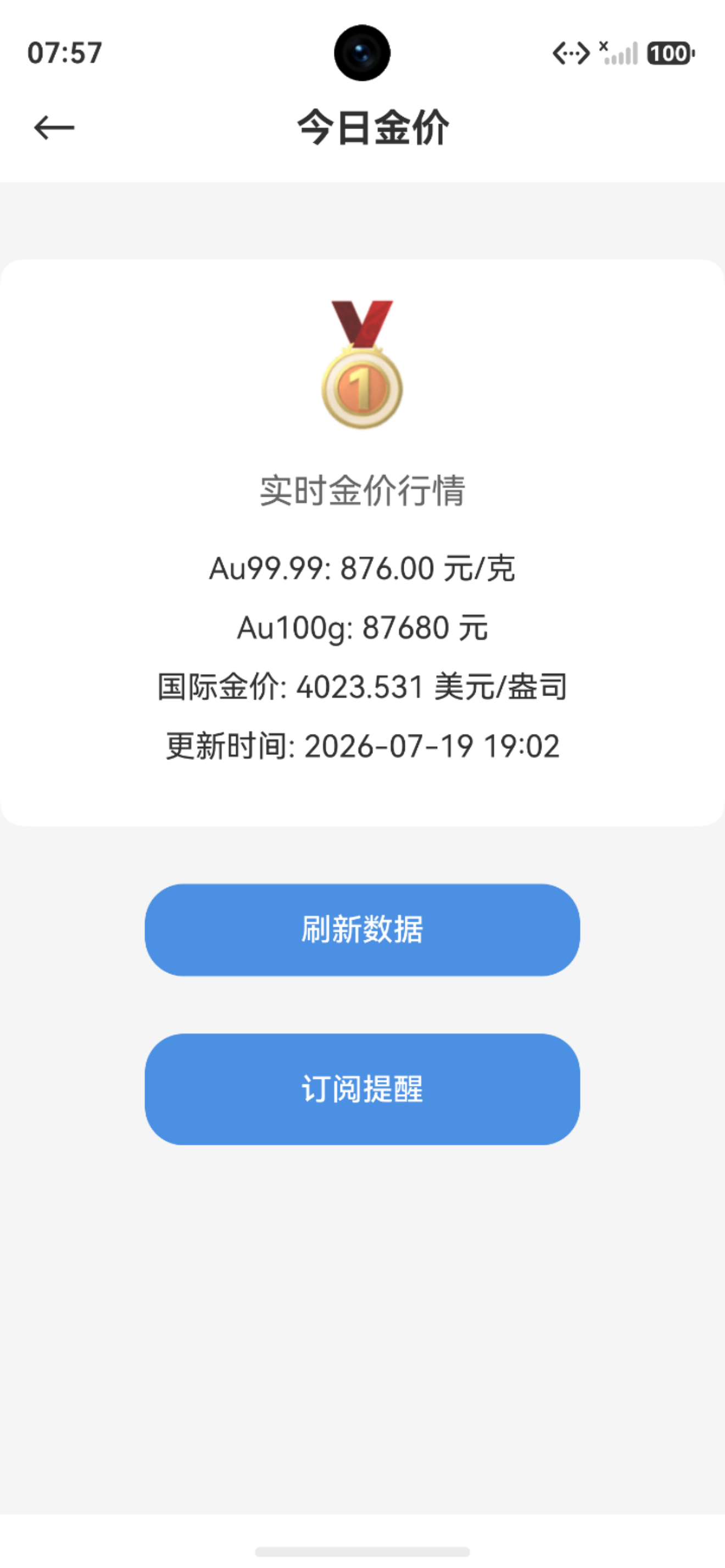
图 1 实时金价页面订阅提醒
六、小结
本文详细讲解了推送通知:
- ✅ 通知服务封装
- ✅ 定时提醒
- ✅ 推送消息处理
- ✅ 消息分类管理
- ✅ 消息中心界面
- ✅ 富媒体通知
- ✅ 通知渠道
系列文章导航:
下期预告:鸿蒙多功能工具箱开发实战(三十一)-小组件开发
© 版权声明
文章版权归作者所有,未经允许请勿转载。