用Spring AI构建智能Agent:从理论到实战落地
目录
1. 什么是Agent
2. Agent企业应用场景举例
2.1. 电商客服的智能分流与工单协同
2.2. IT运维的故障诊断与自愈
2.3. 法务合规之合同审查与风险监控
3. Agent交互流程
4. 使用Spring AI实现Agent
4.1. 创建项目
4.2. 配置application.yml
4.3. 创建服务类
4.4. 创建Controller
4.5. 启动MCP Server应用
4.6. 启动本次编写的Agent应用
4.7. 测试
5. 参考文档
前面的博文《Spring AI之RAG入门》、《Spring AI之MCP入门》介绍了RAG和MCP的基本概念和案例,本篇文章在前面知识的基础上介绍AI领域的另一新名词AI Agent,同时结合Spring AI框架实现一个入门的Agent应用。
1. 什么是Agent
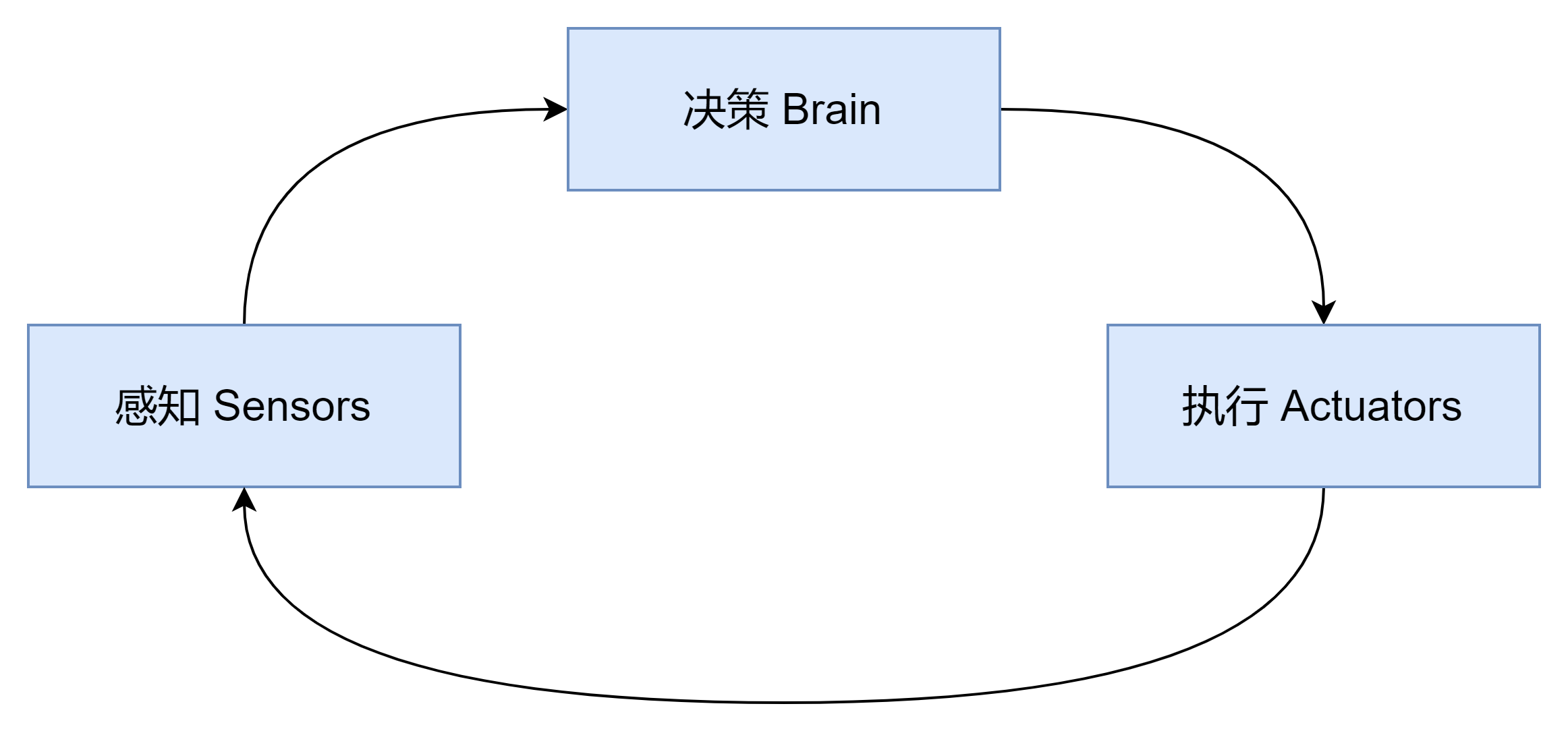
AI Agent是能感知环境、自主决策并执行动作的智能体。与传统程序不同,Agent具备三大核心能力:
-
自主性:无需人工干预即可完成任务
-
反应能力:实时响应环境变化
-
主动目标导向:基于目标规划行动路径
2. Agent企业应用场景举例
AI Agent的价值不仅体现在单一任务的效率提升,更在于构建“感知-分析-决策-执行”的闭环智能体系。下面列举Agent在企业的业务系统、IT运维、法务合规方面的落地案例,展示其如何实现端到端的自动化与智能化。
2.1. 电商客服的智能分流与工单协同
-
感知:Agent通过多模态输入解析(文本+语音)实时捕获用户意图,分析情感倾向。
-
分析:LLM执行语义消歧,联合知识图谱匹配历史工单解决方案。
-
决策:Agent调用规则引擎判断响应策略(AI直接回复/转人工),LLM生成个性化回复草稿。
-
执行:Agent自动触发API工单创建(对接CRM系统),推送LLM生成的结构化指引
2.2. IT运维的故障诊断与自愈
-
感知:Agent通过Prometheus API实时采集服务器指标(CPU/内存/网络),ELK日志代理抓取应用错误日志。
-
分析:Agent调用图神经网络(GNN)工具构建服务依赖拓扑,关联多源告警。LLM执行根因推理(输入:拓扑关系+日志片段 → 输出:故障概率分布)。
-
决策:Agent根据置信度阈值启动自愈流程(>90%自动修复 / 60-90%人工审核)。LLM生成修复策略说明(如:"建议重启nginx服务,因检测到worker进程僵死")及影响范围报告。
-
执行:Agent通过Ansible API执行预定义剧本(服务重启/流量切换),自动验证修复结果并更新CMDB。
2.3. 法务合规之合同审查与风险监控
-
感知:Agent监听合同管理系统Webhook事件,爬取监管机构网站政策更新。
-
分析:Agent触发合同解析Pipeline(OCR+PDF文本提取)。LLM计算合同条款与标准模板的语义相似度来进行条款比对,基于法律知识库RAG的LLM分类器(如:"赔偿金额>合同总额10%"→高风险)进行风险识别,利用多模态分析新闻图片/文本中的政策信号(如反垄断调查关键词)来进行舆情监控。
-
决策:Agent按风险等级启动审批流程(高风险转法务总监/低风险自动标注)。LLM生成修订建议(例:"第5.2条责任上限缺失,建议补充≤合同金额20%条款"),并输出合规预警报告(关联政策变更原文与受影响合同列表)。
-
执行:Agent调用API自动添加合同电子批注,向责任人邮箱推送LLM生成的风险摘要,更新合规知识图谱。
综上可见,Agent = 自动化中枢:负责工具调度(API/脚本)、流程控制、状态监控,LLM = 认知引擎:专注语义理解(日志/合同文本)、知识推理(故障链/法律条款)、内容生成(报告/建议)。
3. Agent交互流程
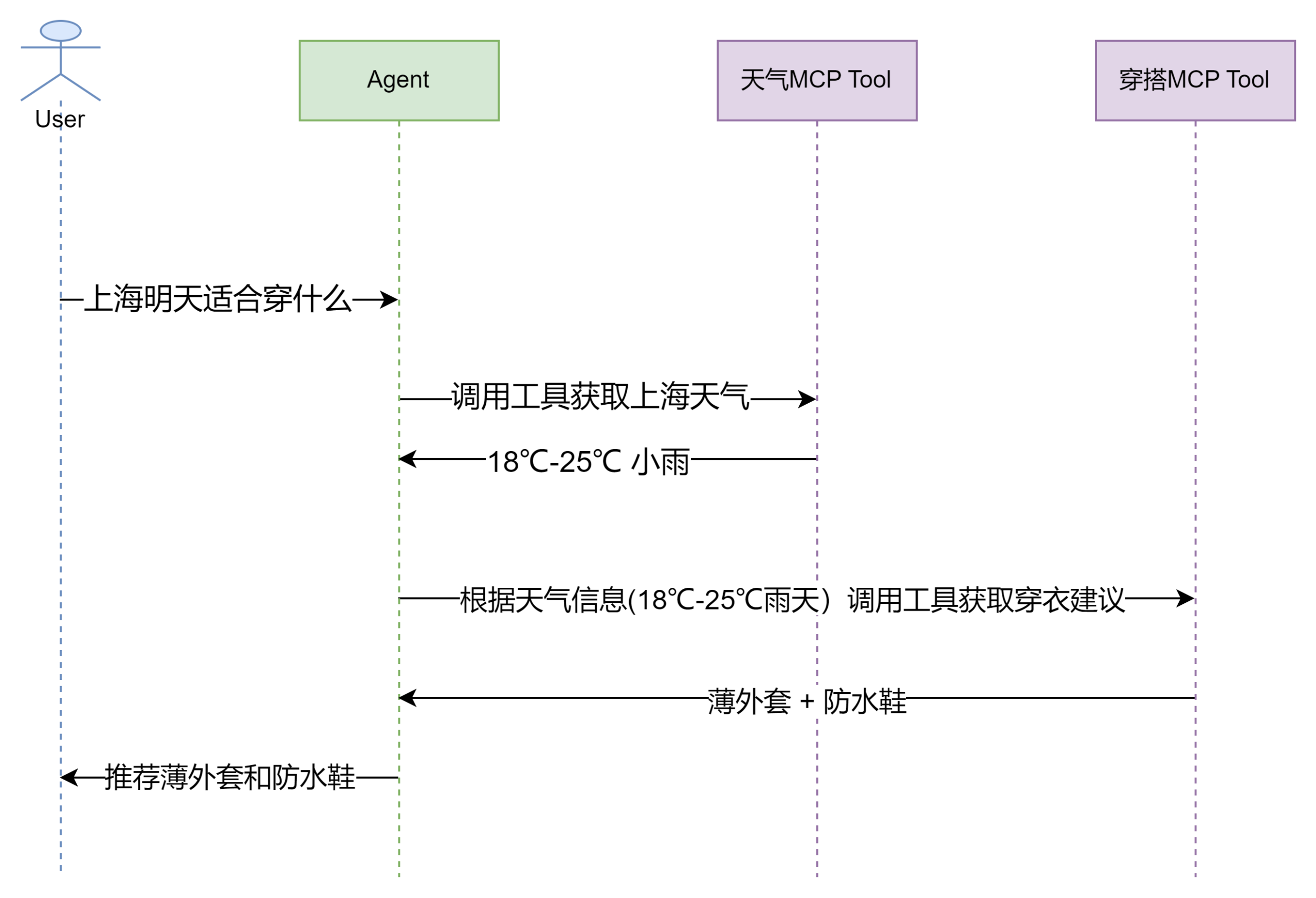
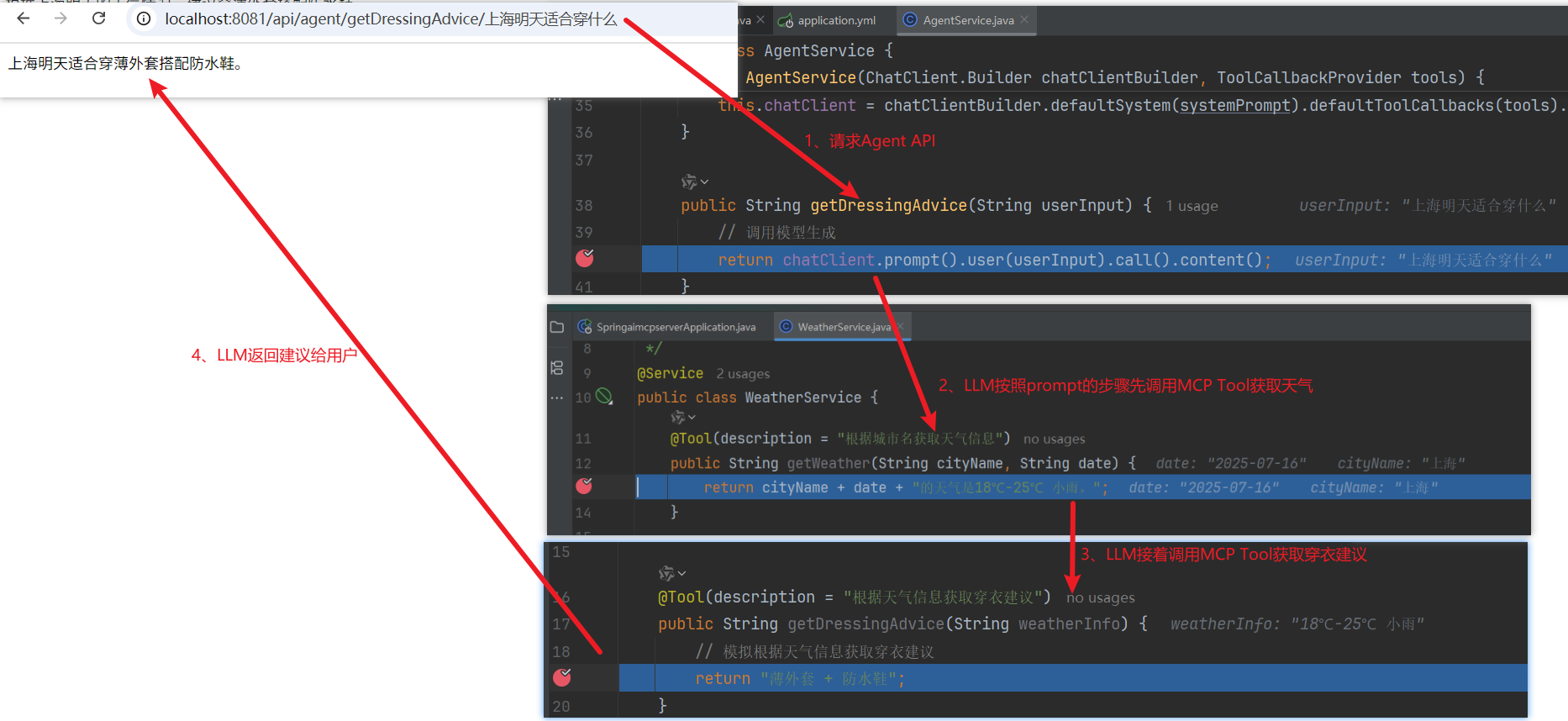
以穿衣助手为例,Agent根据用户输入给出穿衣建议:
4. 使用Spring AI实现Agent
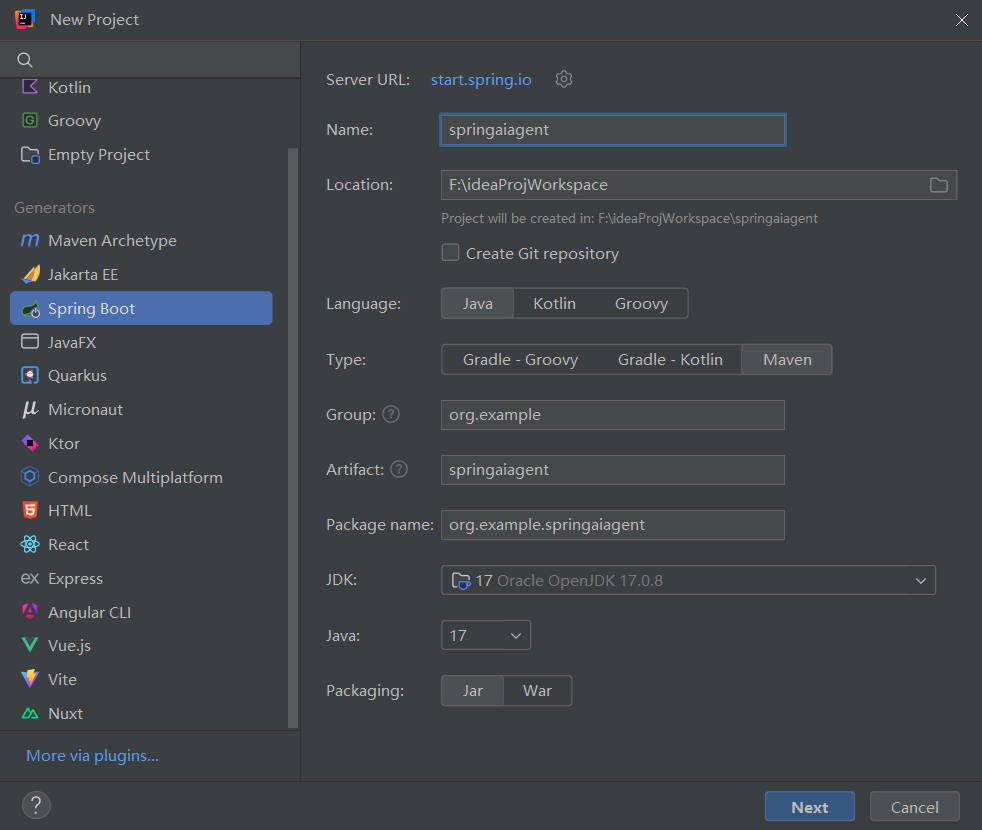
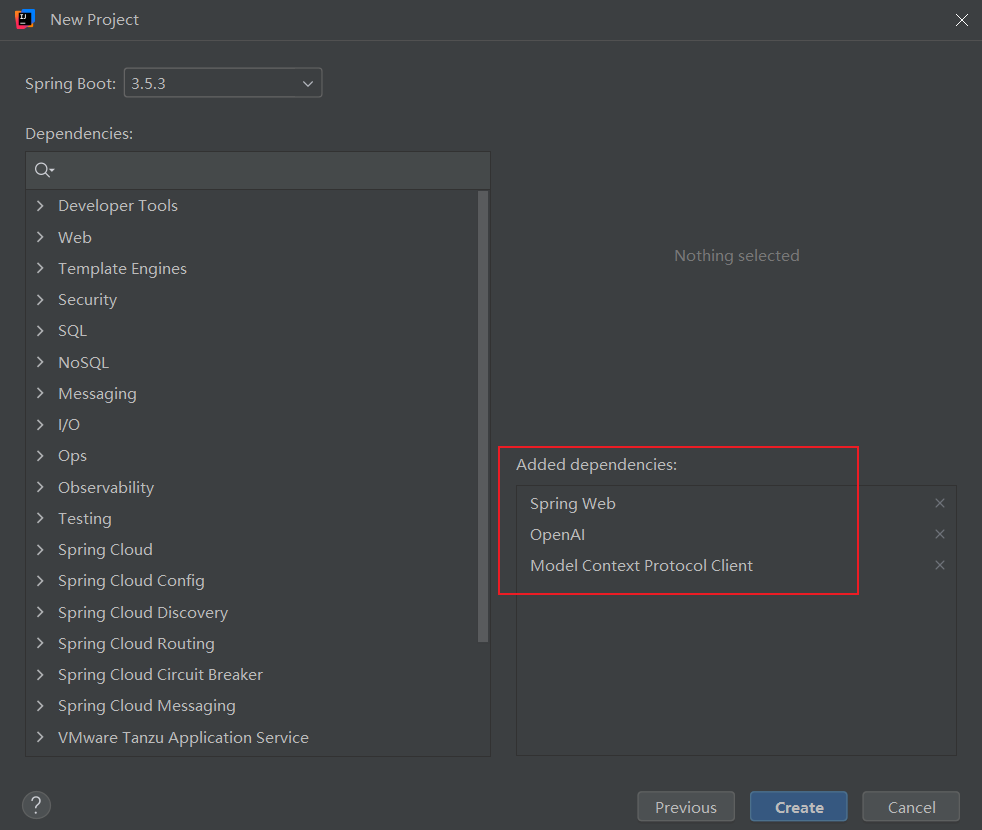
4.1. 创建项目
-
使用idea新建项目

-
选择mcp client、web和openai依赖
- pom.xml
<?xml version="1.0" encoding="UTF-8"?>
<project xmlns="http://maven.apache.org/POM/4.0.0" xmlns:xsi="http://www.w3.org/2001/XMLSchema-instance"
         xsi:schemaLocation="http://maven.apache.org/POM/4.0.0 https://maven.apache.org/xsd/maven-4.0.0.xsd">
    <modelVersion>4.0.0</modelVersion>
    <parent>
        <groupId>org.springframework.boot</groupId>
        <artifactId>spring-boot-starter-parent</artifactId>
        <version>3.5.3</version>
        <relativePath/> <!-- lookup parent from repository -->
    </parent>
    <groupId>org.example</groupId>
    <artifactId>springaiagent</artifactId>
    <version>0.0.1-SNAPSHOT</version>
    <name>springaiagent</name>
    <description>springaiagent</description>
    <url/>
    <licenses>
        <license/>
    </licenses>
    <developers>
        <developer/>
    </developers>
    <scm>
        <connection/>
        <developerConnection/>
        <tag/>
        <url/>
    </scm>
    <properties>
        <java.version>17</java.version>
        <spring-ai.version>1.0.0</spring-ai.version>
    </properties>
    <dependencies>
        <dependency>
            <groupId>org.springframework.boot</groupId>
            <artifactId>spring-boot-starter-web</artifactId>
        </dependency>
        <dependency>
            <groupId>org.springframework.ai</groupId>
            <artifactId>spring-ai-starter-mcp-client</artifactId>
        </dependency>
        <dependency>
            <groupId>org.springframework.ai</groupId>
            <artifactId>spring-ai-starter-model-openai</artifactId>
        </dependency>
        <dependency>
            <groupId>org.springframework.boot</groupId>
            <artifactId>spring-boot-starter-test</artifactId>
            <scope>test</scope>
        </dependency>
    </dependencies>
    <dependencyManagement>
        <dependencies>
            <dependency>
                <groupId>org.springframework.ai</groupId>
                <artifactId>spring-ai-bom</artifactId>
                <version>${spring-ai.version}</version>
                <type>pom</type>
                <scope>import</scope>
            </dependency>
        </dependencies>
    </dependencyManagement>
    <build>
        <plugins>
            <plugin>
                <groupId>org.springframework.boot</groupId>
                <artifactId>spring-boot-maven-plugin</artifactId>
            </plugin>
        </plugins>
    </build>
</project>
4.2. 配置application.yml
server:
  port: 8081
spring:
  ai:
    openai:
      base-url: https://open.bigmodel.cn/api/paas/v4/  # 智谱AI API地址
      api-key: 从智谱官网注册获取https://open.bigmodel.cn/usercenter/proj-mgmt/apikeys # 智谱AI APIKey
      embedding:
        embeddings-path: embeddings # 重新设置智谱AI的向量模型路径,覆盖openAi默认配置
        options:
          model: embedding-3 # 使用embedding-3文本向量模型
          dimensions: 2048 # 向量维度
      chat:
        completions-path: chat/completions # 重新设置智谱AI的聊天模型路径,覆盖openAi默认配置
        options:
          model: GLM-4-AirX # 使用GLM-4-AirX语言模型
    mcp:
      client:
        enabled: true
        name: my-mcp-client
        version: 1.0.0
        request-timeout: 10s
        sse:
          connections:
            server1:
              url: http://localhost:8080
4.3. 创建服务类
package org.example.springaiagent.service;
import org.springframework.ai.chat.client.ChatClient;
import org.springframework.ai.tool.ToolCallbackProvider;
import org.springframework.stereotype.Service;
import java.time.LocalDate;
import java.time.format.DateTimeFormatter;
/**
 * 服务类
 */
@Service
public class AgentService {
    private final ChatClient chatClient;
    public AgentService(ChatClient.Builder chatClientBuilder, ToolCallbackProvider tools) {
        String systemPrompt = """
                你作为穿衣助手Agent,请严格按以下步骤为用户推荐穿衣搭配:
                ### 步骤1:获取当前日期
                当前日期为{currentDate}。
                ### 步骤2:校验用户输入
                如果用户输入不包含城市名则提示用户'请输入城市名', 如果用户输入不包含日期则提示用户'请指定日期'。
                ### 步骤3:根据城市名和日期获取天气信息
                调用MCP Server工具'根据城市名获取天气信息'获取天气信息,入参:城市名cityName、日期date(yyyy-mm-dd格式)从用户输入中提取。
                ### 步骤4:根据天气信息获取穿衣建议
                调用MCP Server工具'根据天气信息获取穿衣建议'获取穿衣建议并输出,入参:weatherInfo,从上一步获取的天气信息的输出赋值weatherInfo。
                """;
        String currentDataStr = LocalDate.now().format(DateTimeFormatter.ofPattern("yyyy-MM-dd"));
        systemPrompt = systemPrompt.replace("{currentDate}", currentDataStr);
        this.chatClient = chatClientBuilder.defaultSystem(systemPrompt).defaultToolCallbacks(tools).build();
    }
    public String getDressingAdvice(String userInput) {
        // 调用模型生成
        return chatClient.prompt().user(userInput).call().content();
    }
}
4.4. 创建Controller
package org.example.springaiagent.controller;
import jakarta.annotation.Resource;
import org.example.springaiagent.service.AgentService;
import org.springframework.web.bind.annotation.GetMapping;
import org.springframework.web.bind.annotation.PathVariable;
import org.springframework.web.bind.annotation.RequestMapping;
import org.springframework.web.bind.annotation.RestController;
/**
 * 获取天气信息Controller
 */
@RestController
@RequestMapping("/api/agent")
public class AgentController {
    @Resource
    private AgentService agentService;
    @GetMapping("getDressingAdvice/{userInput}")
    public String getDressingAdvice(@PathVariable String userInput) {
        return agentService.getDressingAdvice(userInput);
    }
}
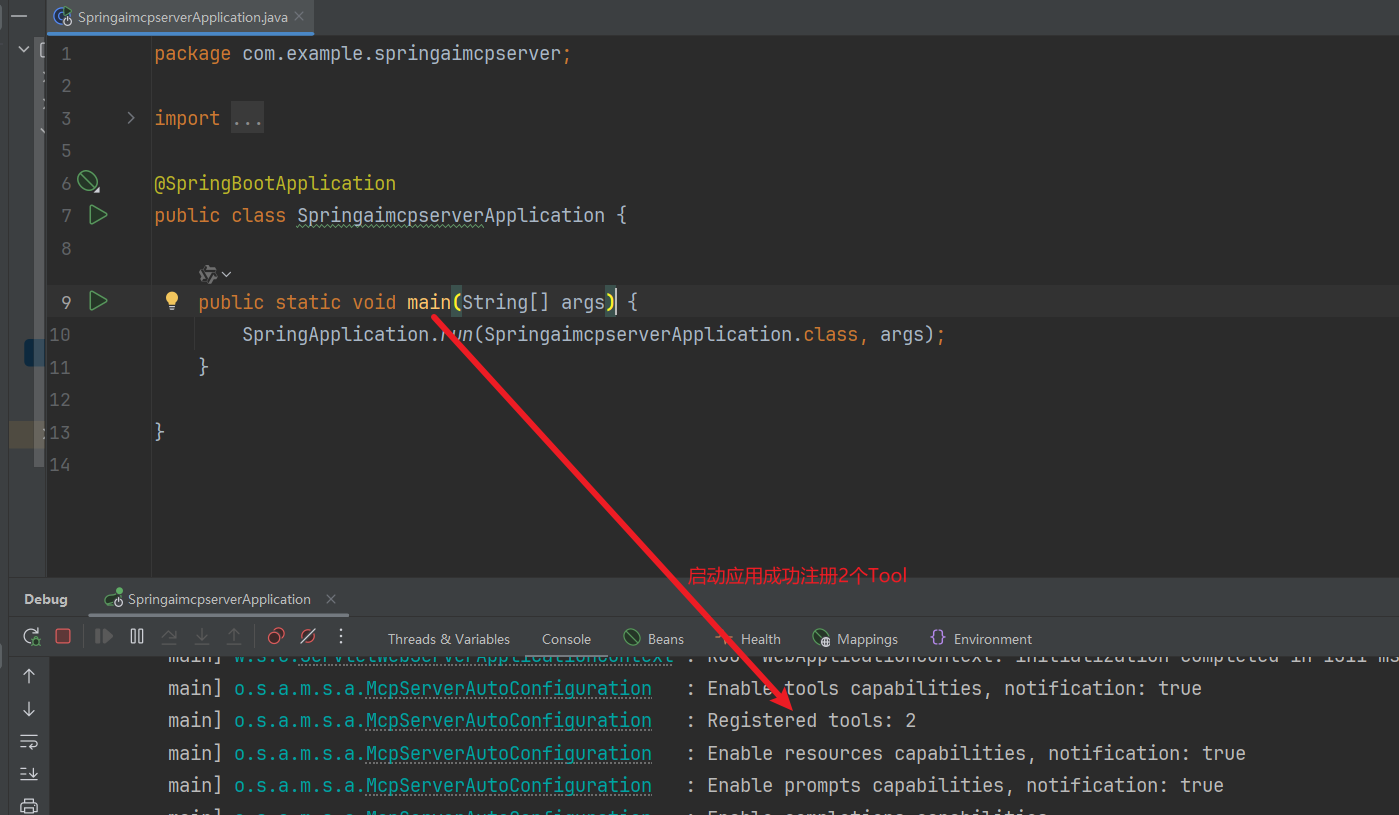
4.5. 启动MCP Server应用
- 改造之前的文章《Spring AI之MCP入门》中的WeatherService,新增“根据天气信息获取穿衣建议”的Tool
package com.example.springaimcpserver.service;
import org.springframework.ai.tool.annotation.Tool;
import org.springframework.stereotype.Service;
/**
 * 包含Tool的天气服务
 */
@Service
public class WeatherService {
    @Tool(description = "根据城市名获取天气信息")
    public String getWeather(String cityName, String date) {
        return cityName + date + "的天气是18℃-25℃ 小雨。";
    }
    @Tool(description = "根据天气信息获取穿衣建议")
    public String getDressingAdvice(String weatherInfo) {
        // 模拟根据天气信息获取穿衣建议
        return "薄外套 + 防水鞋";
    }
}
- 启动应用
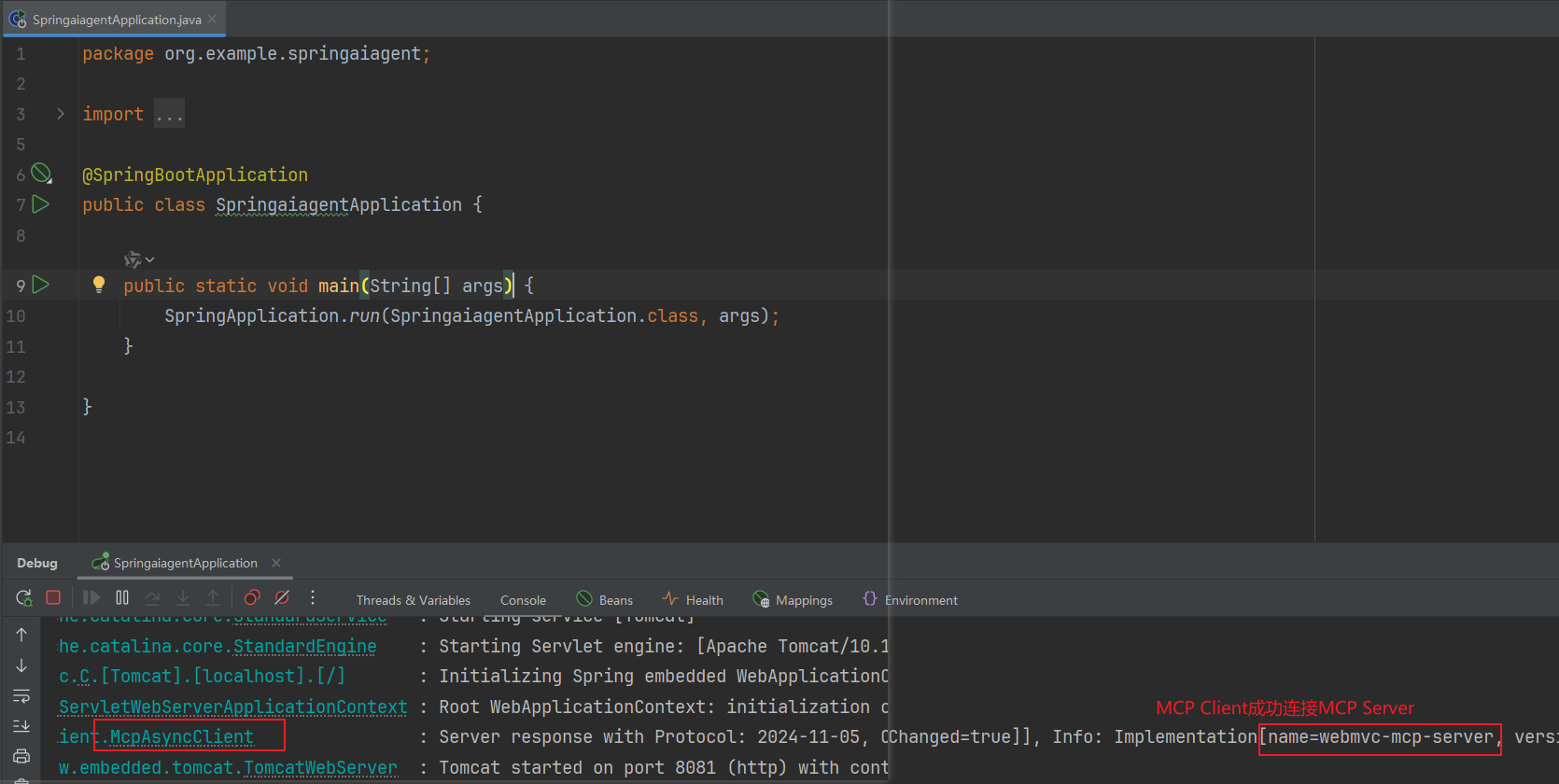
4.6. 启动本次编写的Agent应用
4.7. 测试
- 反向用例:测试输入不包含城市名

- 反向用例:测试输入不包含日期

- 正向用例:测试正常输入
5. 参考文档
Spring AI – Chat Client API官方文档
© 版权声明
文章版权归作者所有,未经允许请勿转载。